< back to main

// filex Linux

filex sends files directly between two computers, encrypted end to end, with no size limit and nothing stored on a server. A tiny relay only brokers the initial handshake — the bytes flow peer-to-peer.

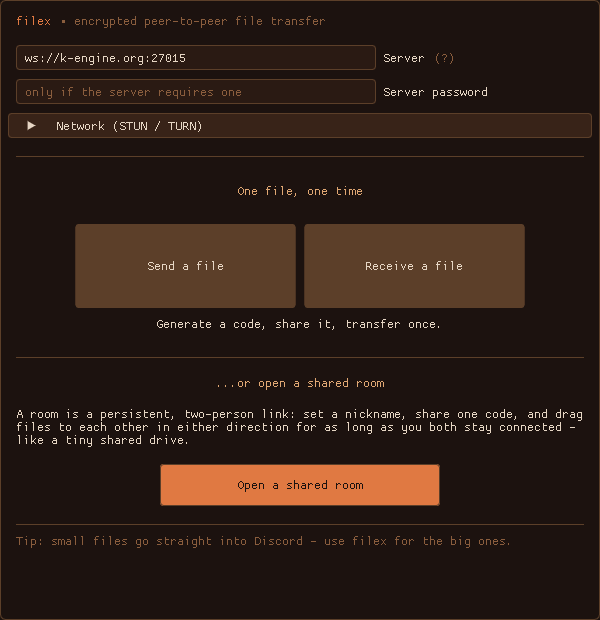
filex client

Drag a file onto the window, optionally lock it with a password, and share the short code (or a filex:// link) with your buddy. Or open a shared room to drag files back and forth in both directions for as long as you're both online — a tiny encrypted drop between two consenting machines.

How it stays private

Every transfer rides WebRTC's DTLS encryption, peer-to-peer. Add a password and the file is also sealed end to end with Argon2id + XChaCha20-Poly1305 — the relay couldn't read it even if it wanted to. The relay never sees a single file byte; it only introduces the two peers, so its bandwidth stays tiny no matter how big the transfer.

Run your own relay

The server is a tiny self-contained binary (or a Docker image). It's stateless and idle-cheap because file data never passes through it. Grab the server build below, or docker compose up from the repo.

Windows builds are below. The client points at the k-engine.org relay by default, but that one is password-gated (it's for friends) — so most people will run their own relay: the server build is a single binary (or docker compose up). Start it, then point the client's Server field at ws://your-host:8080. macOS/Linux builds and code signing are on the way.

// RELEASES //

v1.1.0

Resilient transfers. A dropped connection no longer kills your transfer - filex now reconnects on its own and picks up where it left off.

What's new

- Reconnect + resume. If the link drops mid-transfer (Wi-Fi blip, peer restart, a brief network hiccup) filex re-establishes it on the same code, retrying for up to 60 seconds, and recovers the file in flight. Unencrypted files resume from where they stopped; password-locked files restart (the cipher can't resume mid-stream). Works for both one-shot sends and shared rooms - in a room the queue and the room itself survive the drop too. - Minimize fix. Minimizing the window during a transfer no longer wastes a CPU core (and could crash on some GPUs). Transfers always run on background threads, so they keep going regardless of the window. - Polish. The title bar is now tinted to match the app instead of a bright OS-default strip; the taskbar flashes when a transfer finishes while filex is in the background; room transfers show live speed and ETA; and the can't-connect message now points you at the STUN / TURN settings to fix it.

Same as before: unzip and run filex.exe (the k-engine.org relay is password-gated for friends, so for your own use run the server build and point the Server field at it). A macOS (Apple Silicon) build lands with this release too — unzip and drag filex.app to Applications; it's unsigned, so right-click → Open the first time. Linux builds and code signing are still on the way.

First run on Windows. The builds aren't code-signed yet, so SmartScreen may warn "Windows protected your PC." Click More info -> Run anyway. To be sure you got the real file, verify its SHA-256 against the hash listed above:

Get-FileHash .\filex-client-1.1.0-win64.zip -Algorithm SHA256
filetypesize
filex-client-1.1.0-win64.zip sha256 0f1d4fb5e9ea1b4fc2db725d2abd866dde67c3e1a21e57b8933851717418e865 Windows Client (portable) 5.8 MB
filex-server-1.1.0-win64.zip sha256 52a12143bacbbdd55a8dd5e89eff079411e79da8d21ab8dbdef5b599ba826266 Windows Server (relay) 4.8 MB
filex-1.1.0-macos.zip macOS App · Apple Silicon (arm64) 5.5 MB

v1.0.0

First public release. Windows builds for now — macOS and Linux will be added under this entry once they're cut.

Client — unzip and run filex.exe (keep the bundled DLLs alongside it). The default relay (k-engine.org) is password-gated for friends, so to use filex yourself, run the server build below and point the client's Server field at it (ws://your-host:8080). Then drag a file in, share the code or a filex:// link, done. Shared rooms, per-file passwords, live speed/ETA, and a STUN/TURN panel for strict NATs are all in there.

Serverfilex-signal.exe runs your own relay (filex-signal.exe 8080, or point it at a config file). Only the handshake passes through it, so its bandwidth stays tiny no matter the file size.

Windows may flag the unsigned binaries ("Windows protected your PC" → More info → Run anyway). Signed builds are coming.

filetypesize
filex-client-1.0.0-win64.zip Windows Client (portable) 5.8 MB
filex-server-1.0.0-win64.zip Windows Server (relay) 4.8 MB

// FILEX DEVLOG

all entries →