This one started as a security audit and kept going. If you run a K-os server for people who aren't all your close friends, this is the release that makes that reasonable.
The audit. I tasked AI to go through the server and client looking for the boring ways a chat app gets broken: parsers that trust a length field, link previews that will happily fetch http://192.168.1.1, sessions that could be freed while something still pointed at them, images that decode into a gigabyte of memory. All of that is fixed, every protocol message now goes through a fuzzer, and the login moved to a new protocol version with PBKDF2 and a per-server salt. Accounts migrate on their next login, so nobody has to reset a password.
Moderation that respects DMs. Timeouts, AutoMod, a report queue, webhooks and bot slash commands are all in. The one rule I didn't want to bend: DMs are end-to-end encrypted, so a DM report carries no text at all. A moderator can see who reported whom and when, and can time the sender out, but there is no path for a server owner to read a DM. Reports from encrypted channels only include the one message the reporter chose to share.
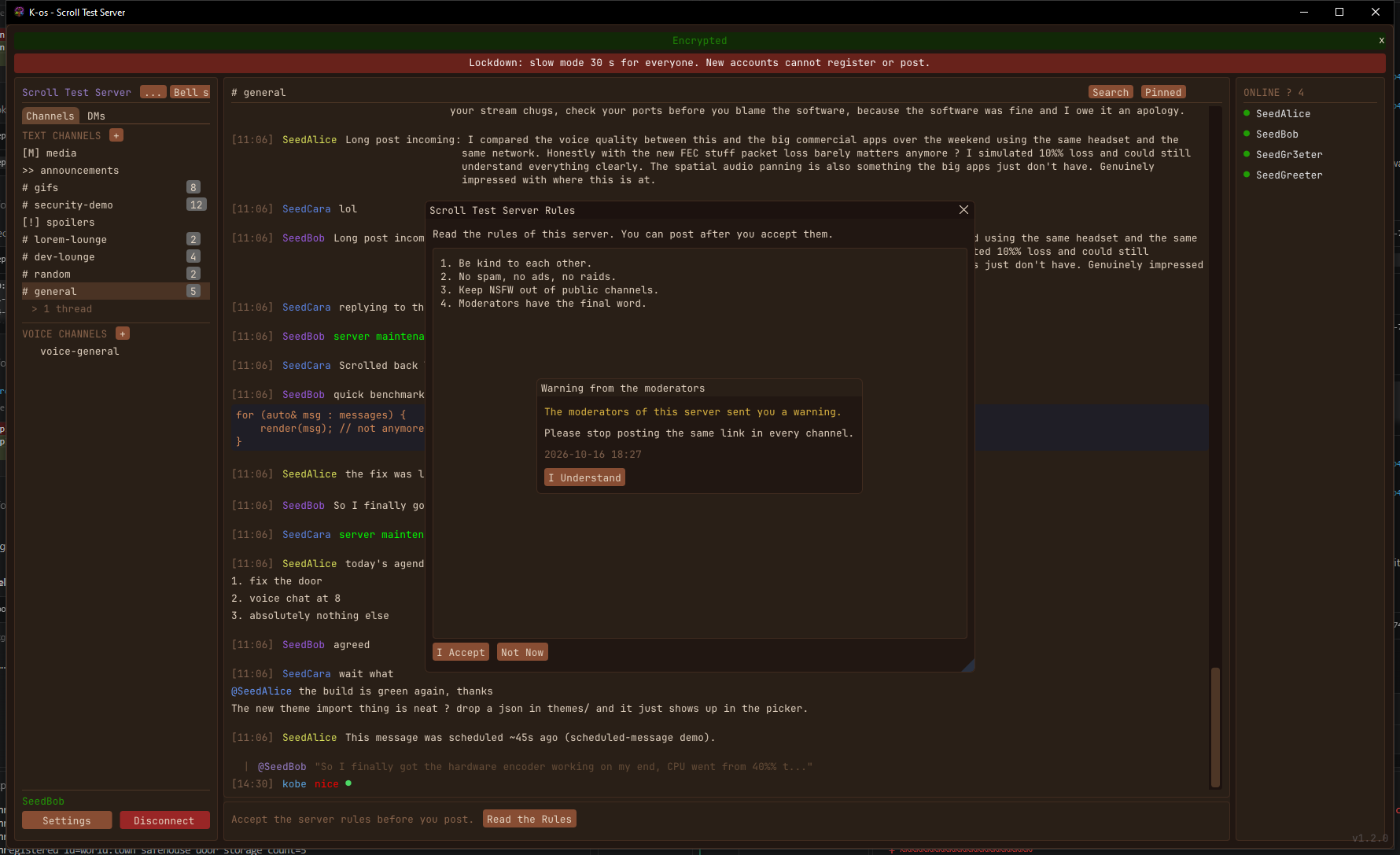
Tools for the person who owns the server. The thing I kept picturing was a raid: fifty fresh accounts showing up at once to spam. Now there's a Start Lockdown button. It stops new registrations, puts everyone on slow mode and holds new accounts until things calm down, and moderators keep working as normal. Around that:
- an optional join gate, so new accounts wait a while before they can post or DM, - optional server rules that members accept before they post, - moderator notes and warnings that stay with an account, so you can see someone's history when they come back, - a storage dashboard with per-user use, the largest files, and an optional per-user limit, - a server health page: uptime, memory, users, messages per minute, traffic, - temporary roles and a role on join.
Opt-in tools for the paranoid. Messages can be signed with a per-device key, and the badge works like SSH: it tells you when a person's key changes. Behind an "advanced security" switch there are DM safety numbers, look-alike name warnings, server key history and a log of who holds each encrypted channel's key. All off by default, because most people shouldn't have to think about any of it.
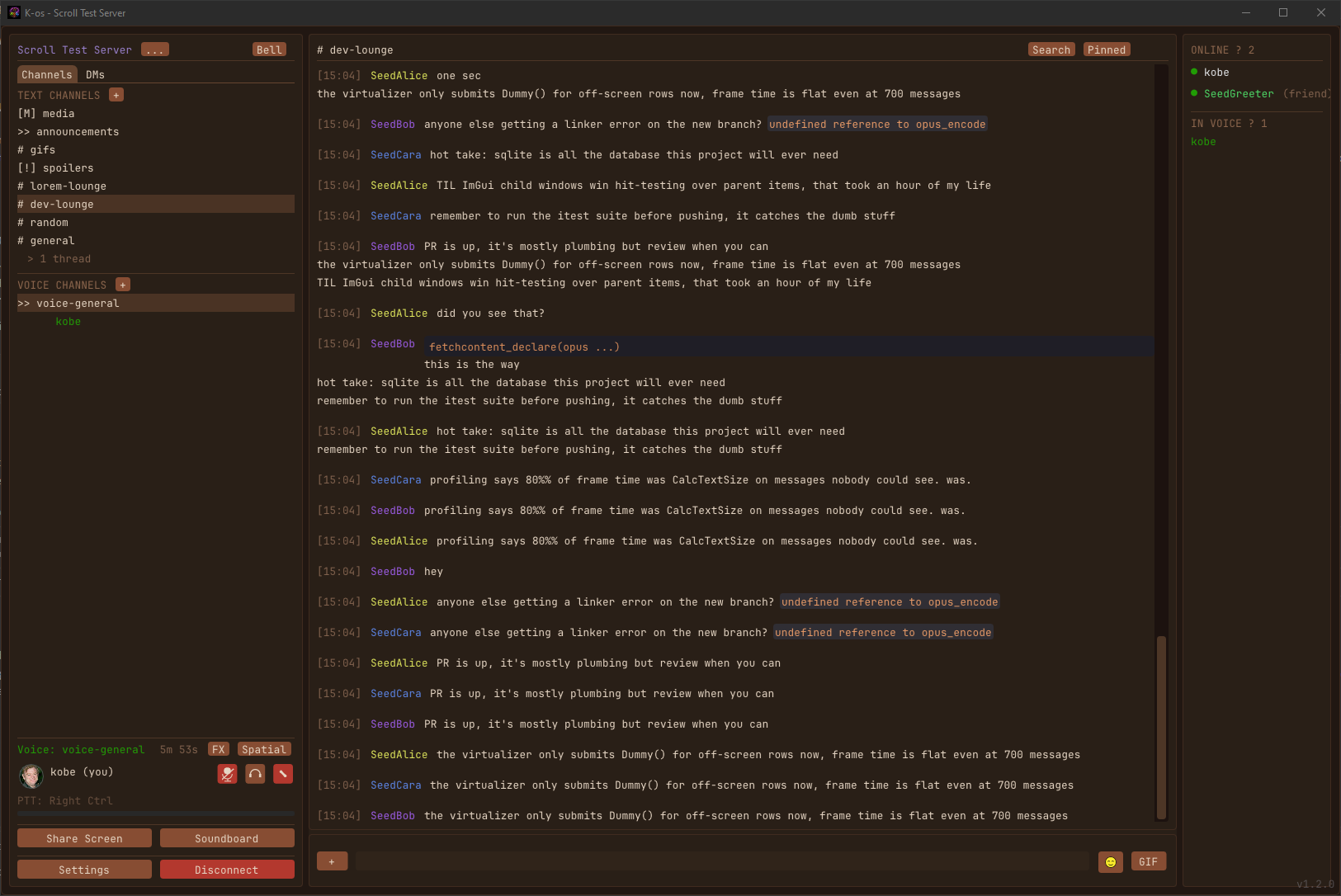
A smoother client. Image decoding, thumbnails, disk reads and upload prep all moved off the UI thread, so scrolling through a media-heavy channel no longer stutters. The settings window got rebuilt into pages with a search and automatic saving, threads got replies, and GIF avatars finally animate in profiles.
One upgrade note again: this is protocol v4, so clients and servers both need updating. A v1.3 client won't connect to a v1.2 server. Full list is on the release page →.
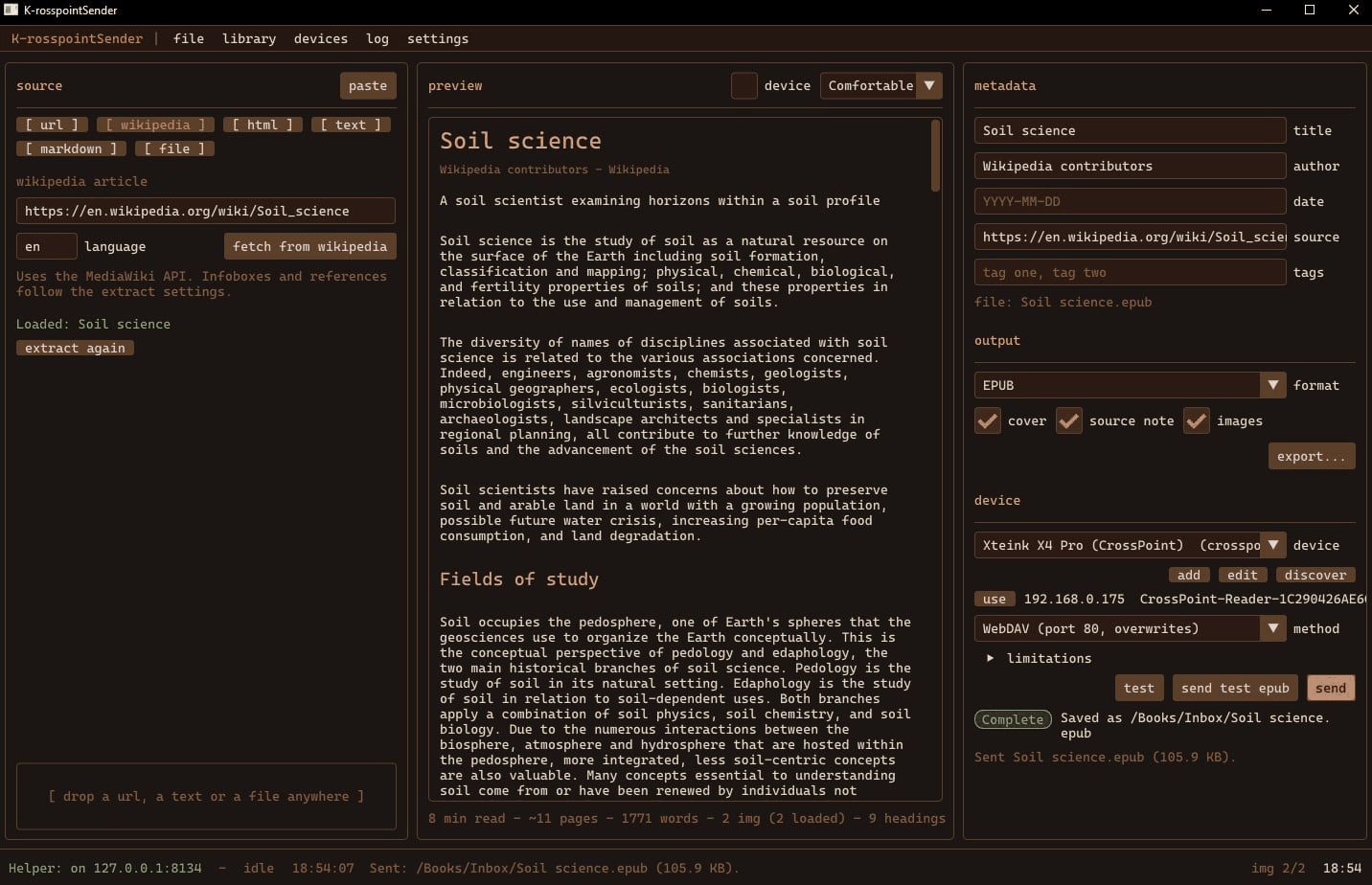
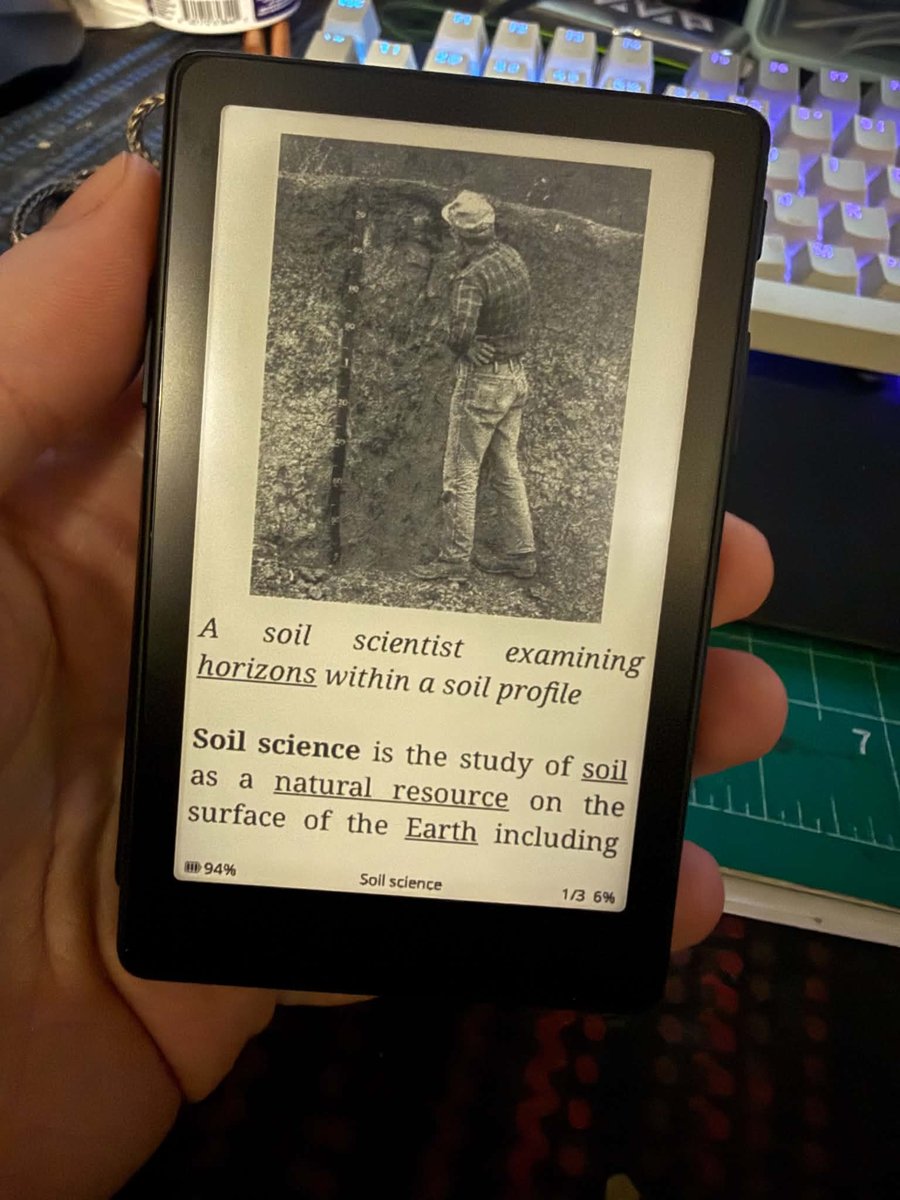
I bought an Xteink X4 Pro. It's a pocket e-ink reader, phone-sized, four inches, about a hundred dollars, and the community has written an open firmware for it called CrossPoint that's better than what it shipped with. The reading experience is great. Getting things to read onto it was not: Calibre, or a cable, neither of which is where I am when I find something worth reading. So the project is one sentence long. Paste a link, press send, pick up the reader.
Two apps. The web app is a static page — it runs in your browser, keeps its library in IndexedDB, and never talks to this server after it loads. It does the cleanup, builds the EPUB, and can send to the reader when the browser lets it. The desktop app is the same pipeline rewritten in C++ with Dear ImGui, for the parts a browser won't do: fetching any URL, finding the reader on the network, and sending to an http:// device from what would otherwise be an https:// page. It also sits at 127.0.0.1:8134 as a helper, so the hosted web app can hand it the file and let it do the sending. The two share one design, one EPUB layout, one set of defaults.
CrossPoint's API is nice. I read the firmware source rather than guess. On the File Transfer screen it serves HTTP on port 80 with a multipart upload, WebDAV on the same port, a WebSocket upload on 81 that streams progress, and a UDP listener on 8134 that answers "hello" with its name. All of it unauthenticated, all of it CORS-enabled, which is a gift to a browser app. The one thing it won't do is answer a broadcast reliably over Wi-Fi — access points and the ESP32's power save eat them — so discovery in the desktop app also says hello to every address on the subnet one at a time, then probes port 80, then tries crosspoint.local. The first version only broadcast, and the reader sat there showing its QR code while the app found nothing. Reading the source again is what fixed it.
The renderer dictates the book. CrossPoint's EPUB engine draws JPEG and PNG and nothing else, reads about a dozen CSS properties, and ignores font-size entirely. So every image is re-encoded to grayscale baseline JPEG at 480 pixels wide before it goes in, the stylesheet uses only what the device reads plus a little for other readers, and the presets are honest about what they change. Every EPUB either app produces passes epubcheck — I ran it on a lot of them, and it found two real bugs on the way: a table of contents with duplicate play orders, and Wikipedia's habit of using definition lists as headings, which an EPUB validator rightly calls invalid.
Spider packs are the part I wanted. Start from one Wikipedia article and the app scans what it links to — through the MediaWiki API, filtering out the Help: and Category: namespaces, the edit links, the citation anchors, the navboxes at the bottom, the red links, the language links, and anything that only appears in an image caption gets ranked below what's in the prose. You tick the pages you want and get one EPUB. Links between the pages you took work inside the book. Links to pages you didn't take stay as URLs with a small arrow, so you know which is which before you tap. The pack gets an index, an external-links page, a missing-articles page, and an attribution page listing every source and the CC BY-SA license, because that's the deal with Wikipedia. Steam engine with boilers, pistons and James Watt is about 300 KB and reads like a short book.
Nothing phones home. The web app's only network calls are the article you asked for, its images, and the reader. The desktop app has no update check and no telemetry. The library, device profiles and settings are yours, in your browser or your user folder, with a delete button.
It was proven the honest way: discover the reader, send a Wikipedia article from the desktop app, open it on the device, read it. Then the same with a pack. The desktop build is portable — unzip and run — and both apps are MIT on GitHub.
This one started with a crash report and ended up being about motion — the kind that tells you something rather than the kind that just moves.
The app crashed, and the sun did it. A user (me) came back to a dead app and a pair of crash dumps. The exception code was 0x20474343, which spells " GCC" in ASCII: not a bad pointer, but an unhandled C++ exception. Reading the stack out of the minidump pointed at the solar activity fetcher, and the cause was genuinely delightful: NOAA publishes an X-ray flare that is still in progress with "max_class": null, and that entry is the newest one in the feed — the very first the app looks at. The JSON library's value(key, default) only falls back when a key is absent; a key that exists holding null throws instead. That throw happened on one of the parallel enrichment threads, and an exception escaping a thread terminates the process outright. So: the sun flared, and my weather app died.
It's fixed twice over. Every string read from a network feed now tolerates null and wrong-typed fields, and every one of the fifteen enrichment fetchers is wrapped so a feed that ships an unexpected shape loses its own data and nothing else. Crash reports now also carry the version, a build id, the faulting thread and the actual call stack, so the next one is diagnosable from a text file — including one from a machine that isn't mine.
The window remembers its size, for real this time. Geometry was only written to disk when the app shut down cleanly. But closing the window on a tray app just hides it, so that path almost never runs — four clean shutdowns out of fifty-seven launches in my own log. The size you set was quietly thrown away every other time. It's now saved a moment after you finish dragging, and a maximized window is remembered as maximized without clobbering the windowed size underneath it.
The sun travels its arc. Open the app at 5pm and the sun rises and runs along the day's arc to where it actually is, laying down a lit trail behind it. After that it just keeps time — about one pixel every two and a half minutes, for the rest of the day. No animation, no wasted frames; the position is read off the clock. Solar noon is marked at the apex.
And the tide does the same. The tides card now draws the curve between the listed extremes with a marker at this minute: "Now ~2.3 ft, rising". Water follows a cosine from one extreme to the next — slack at the turns, fastest mid-cycle — so this is interpolated properly rather than drawn as a straight line between two times.
There's a handful of smaller motion too: a spinner while a fetch is in flight, alerts that slide in instead of appearing on top of what you were reading, the sky cards cross-fading instead of hard-cutting, the headline temperature easing to its new value (worth it when you switch to a city twenty degrees away), and the seven-day column under your pointer tinting so it's obvious which day the tooltip belongs to. The rule I held to: each one either rides frames the app was already drawing, or is a sub-second one-shot that lets the renderer go straight back to sleep. This app draws about 95% fewer frames than a naive dashboard and I'd like to keep it that way, so the flashiest option — rain streaking down the window, snow drifting — didn't make the cut. It needs frames forever.
Free and keyless as always, all learning local, nothing about you leaves your machine. MIT-licensed, portable — unzip and run.
A GIF library that doesn't phone home. Every chat app just uses Giphy or Tenor, which means signing up for an API key, living with a rate limit, and letting a third party watch what everyone searches for. That felt wrong for something you self-host, so K-os does it the other way around: the server keeps its own library, built from the GIFs people actually post there.
Drop a .gif in a channel and it's indexed automatically. Hit the GIF button and you're searching your server's own collection — by filename or by tags an admin has added — and posting one back just re-references the file that's already there, so no re-upload and no duplicate storage. The ones people use most float to the top. Over a few weeks a server ends up with its own vocabulary of in-jokes, which is frankly just more fun.
If you'd rather curate than collect, gif_auto_index turns the automatic part off and you add GIFs deliberately. Encrypted channels and DMs never feed the library at all — those stay sealed, which is the whole point of them.
The input bar can finally hold a paragraph. the bloat of six buttons wedged around a single-line text field, and if you wanted to write more than a sentence you lost context visibility. Now Shift+Enter makes a new line (Enter still sends), auto adjusts lines, and you can drag its top edge taller if you're writing something long. Left side is just attach; right side is emoji and GIF. Formatting, chat effects, voice messages, scheduling and polls all moved into a right-click menu on the input itself same tools fewer buttons.
Chat that's easier to read. Messages used to run together in one undifferentiated column. Now there's a configurable gap wherever a different person starts talking — consecutive messages from the same person still stay tight, so you get visual grouping without wasting vertical space. It's a slider in Settings → Appearance, 0 if you liked it compact.
Opening a channel with unread messages also behaves properly now: instead of dumping you at the newest message with no idea what you missed, it lands you on the first unread one, with the messages before it still visible above for context. There's a red "New" line marking the spot, and it clears itself once you start scrolling. Also a toggle, if you'd rather always jump to the latest.
Smaller things: threads stopped showing a running reply count that went up when you replied to a thread you'd already read (the unread badge does that job properly), the age-confirmation checkbox moved off the login screen into the registration step where it belongs, and messages can now be attachment-only — posting an image with no caption used to be silently dropped by the server, which is also what was quietly breaking the GIF button before release.
One upgrade note: this bumps the wire protocol, so clients and servers both need updating. A v1.2 client won't connect to a v1.1 server. Full list is on the release page →.
A small release about a big annoyance: the app told you the same thing too many times. "Temps warming to 85F in the next few days" would arrive as a fresh notification every day on the way to that day — and a few times per day at that, plus once more every time you relaunched the app. I audited the whole notification path and the fix turned out to be about identity.
One event, one notification. Every alert is now keyed to the day of the thing it's describing — the warm day, the rainy day, the meteor shower's peak night — instead of the day it happened to be issued. Seen three days early or three hours early, across any number of refreshes and restarts: same event, same single notification. If the details drift as the day approaches (85F becomes 88F), the existing entry updates in place instead of showing up again as unread.
Dismiss means until it's over. Dismissing a notification — from the toast, the banner, or the new per-row Dismiss button in the mailbox — now keeps that event quiet until its day has fully passed. Acknowledge the warm-up once on Monday and you won't hear about it again; the app assumes you remember Wednesday exists. Dismissals and already-notified state persist on disk (a ~60-byte JSON file, in keeping with this app's database), so restarts don't replay the backlog. There's a "Mark all read" button now too.
Quieter by default. Rain alerts no longer fire on trace amounts — a 0.4 mm drizzle forecast at 40% odds isn't news — and rain and snow alerts now say which day they mean instead of a vague "expected".
Nothing else moved in this one. If you're on 1.3 or 1.4 the app will offer the update itself.
Three new tools land on the misc shelf today, each aimed at a job people habitually hand to a sketchy website: scanning a document, encrypting a file, and cutting an audio clip. All three run entirely on your device.
Scan Desk is a flatbed for the photos already on your phone. Drag the four corners onto a document and it solves the homography that warps that crooked quadrilateral into a flat, rectangular page, then runs an adaptive (local-mean) threshold that erases shadows and yellow-paper tint for a true scanned look. Stack the pages, reorder them, save one PDF. The warp, the threshold, and the PDF writer are all hand-written; there's no OCR, just a very clean picture of the page — verified by decoding the exported PDF back and confirming a skewed dark photo comes out a 91%-white straight page.
Lock Box is the strongbox next to Key Cutter, and it's the one I was most careful with, because rolling your own crypto is how people get burned. So it doesn't invent anything: it speaks four formats that already have real software on the other side — password-protected ZIP (AES-256 and the weak-but-universal legacy kind), age, and OpenSSL enc — and it works both ways, reading files those tools produce and writing files they can open. The AES-CTR, ChaCha20, Poly1305, scrypt, and MD5 cores are hand-written and pinned to the RFC test vectors. That verification earned its keep: the first cut of Poly1305 passed its own round-trip but failed the RFC vector, because a 26-bit-limb multiply silently overflowed JavaScript's 2⁵³ integer ceiling. The fix was the proven 13-bit-limb approach — and then real age, openssl, and 7-Zip-class unzippers all opened Lock Box's output, and it opened theirs (including OpenSSL's ancient MD5 key derivation and age's 2¹⁸ scrypt). GPG is deliberately left out; its format is a labyrinth, and age is the modern answer.
Tape Desk is a tape bench for audio: drag two handles to select, preview it, trim to it, or splice several clips end to end with an optional fade — then save a WAV. One button sets the classic 30-second ringtone length. The browser's own engine decodes MP3/M4A/OGG/WAV; the waveform, the trim/join/resample, the fades, and the 16-bit WAV encoder are hand-written. Checked by feeding it 440 Hz and 880 Hz test tones and proving by FFT that a trim lands the exact duration at the right pitch and a join comes out 440 Hz then 880 Hz. It saves lossless WAV on purpose — send it through File Mill for an MP3.
Versioned scan-desk-1.0, lock-box-1.0, and tape-desk-1.0; all three are in the downloadable source bundle.
Draft Desk got a sibling on the misc shelf: Sheet Desk, a quick editor for Excel spreadsheets. Same desk, same deal — open the file, fix the numbers, save it back, and nothing ever leaves your browser.
An .xlsx turns out to be the same trick as a .docx: a ZIP of XML files. So Sheet Desk reuses the shelf's hand-written ZIP machinery and adds a hand-written SpreadsheetML reader and writer — shared strings, multiple sheets, date serials (1900 leap-bug included, the way everyone ships it), column widths. No libraries; unlike its siblings there isn't even a build step. The page you open is the source, comments and all.
The surprise was how much of a spreadsheet is the formulas, not the grid. A viewer that shows you stale numbers isn't an editor, so Sheet Desk grew a small formula engine: a tokenizer, a recursive-descent parser, and about twenty-five everyday functions — SUM through COUNTIF, IF and IFERROR, cross-sheet references like =Ledger!D6, cycle detection instead of a hung tab. Insert a row and your references rewrite themselves the way Excel would; delete the row a formula points at and it says #REF! to your face. Anything fancier (VLOOKUP, array formulas) shows #NAME? here but is preserved untouched and recalculated by Excel on open — the same honest-limits contract as Draft Desk, printed right on the page.
Verified the paranoid way, as usual: saved workbooks torn apart and re-read by an independent parser — values, formulas with cached results, real date cells, booleans, column widths all intact — and workbooks written by other software opened back through the hand-written reader, DEFLATE, umlauts, and all. Versioned as sheet-desk-1.0; the source bundle grew accordingly.
The theme of the batch: tools people google every day — "word search maker", "qr code generator", "password generator", "blur a screenshot", "diff checker", "draw my signature", "printable graph paper" — where the top results are ad farms that upload your stuff, watermark the output, or kill your QR codes when the free trial lapses. Every one of these runs entirely in the browser, works offline if you save the page, and does none of that.
Each got its own little world, in the shelf tradition: Puzzle Press is a small-town newspaper's puzzle page (it's literally Pamphlet Press's puzzle engine — word search, scramble, uniqueness-checked sudoku, mazes — given a page of its own with an answer key). Beacon is a signal lamp at night; its QR encoder is written from scratch — Reed-Solomon error correction over GF(256), all eight mask patterns scored per spec — and verified in tests by round-tripping every output through an independent decoder. Key Cutter is a locksmith's bench: passwords from real cryptographic randomness with rejection sampling (no modulo bias), passphrases from the EFF diceware list, and entropy math that assumes the attacker knows exactly how the password was made. The Redactor is a censor's desk that refuses on principle to offer gaussian blur, because blurred text can be reconstructed — black bars and honest pixelation only. Proof Desk runs Git's Myers diff algorithm, hand-written, on text that never leaves the page. Inkwell turns a signed squiggle into a cropped transparent PNG. Paper Press prints graph paper, dot grids, lined paper, music staves, and any month's calendar at exact millimetre spacing.
All seven are single self-contained HTML files, 12–93 KB each, zero runtime dependencies — the QR encoder, the diff algorithm, the entropy math, and the puzzle generators are all hand-written and small enough to read. Versioned on the shelf as *-1.0, the lot of them.
Two more for the misc shelf, built as one codebase and shipped as two pages: Draft Desk, a quick editor for Word documents, and Form Desk, a fill-sign-and-shuffle desk for PDFs.
The pair exists because "edit a PDF" and "edit a document" are usually the same wish — make a small change without uploading my file to a stranger's server — but completely different problems. A .docx is secretly a ZIP of XML files, so Draft Desk opens and saves real Word documents with a hand-written reader and writer (the same ZIP machinery File Mill uses for Excel), zero libraries, 40 KB. It's WordPad on purpose: bold, headings, lists, tables, images — and an honest contract that heavier formatting gets simplified on save.
A PDF, on the other hand, isn't a document at all — it's frozen print, and no browser tool can honestly re-typeset it. What people actually need is to put new ink on it: type into the blanks, check the boxes, date it, sign it. Form Desk does exactly that — draw your signature with mouse or finger (the same ink engine as Inkwell, smoothing and all) and drag it onto the line — plus the page surgery everyone googles: merge PDFs, split, reorder, rotate the sideways scan, delete the blank page. A metadata tab strips the document's hidden author/software fields, Photo Cleaner-style. This one stands on two giants — Mozilla's pdf.js renders, pdf-lib rewrites — both open source, both running locally; it's the shelf's heavyweight at ~3 MB, and worth every byte the day a lease shows up in your inbox.
Both were verified the paranoid way: saved .docx files re-parsed and opened with Apple's own document engine, signed PDFs decompressed and checked for the typed text and embedded signature, then rendered by macOS to prove they're real. Versioned as draft-desk-1.0 and form-desk-1.0.
Every photo from a phone or camera carries a hidden cargo of metadata: the exact GPS coordinates where it was taken, the camera model and serial number, timestamps, editing software. Share the photo and you share all of it. The usual fix is uploading your pictures to some stranger's "free EXIF remover" website, which is exactly backwards. So: a darkroom that runs in your own browser. Drop photos in, see what they're leaking (GPS gets flagged in red, with a copy-coordinates button so you can check the spot yourself), and develop clean copies. Nothing is ever uploaded — the page works with the network cable unplugged.
The cleaning trick is that there is no cleaning. Instead of trying to edit metadata out of the original bytes — and inevitably missing a maker note or a thumbnail somewhere — the image is decoded to raw pixels and re-encoded as a brand-new file through Canvas. The output can't contain metadata; it was never told any. EXIF rotation gets baked into the pixels on the way through so nothing comes out sideways.
The fun parts were the format bestiary. JPG, PNG, and WEBP metadata are read by a hand-written parser (TIFF IFD walking, RIFF chunks, PNG chunks — no libraries). RAW files (DNG/CR2/NEF/ARW…) turn out to be TIFF containers, so the same parser reads their GPS and serial numbers directly, and cleaning extracts the full-size JPEG preview every RAW carries inside — honestly labeled, since a browser can't develop sensor data. HEIC was the one that earned a dependency: only Safari decodes iPhone photos natively, so libheif rides along compiled to WebAssembly, and an ISO-BMFF box parser digs the EXIF out of the HEIF structure by hand.
Like Pamphlet Press, it's one self-contained HTML file — save it, stick it on a USB drive, it works forever. Versioned on the misc shelf as photo-cleaner-1.0.
The "free online file converter" is one of the internet's oldest bad deals: you hand a stranger's server your spreadsheet, your photos, your notes, and in exchange you get the file back in a different format plus an ad farm and whatever their logs keep. The formats involved are almost never actually hard — so File Mill does the same job with no server at all. Drop files in, pick an output, download. Pull the network cable mid-conversion and nothing changes.
It turns out browsers quietly ship most of a file-conversion toolkit. Canvas decodes and encodes images (SVG included — and WEBP/AVIF output is capability-detected, so you're only offered what your browser can truly encode). DecompressionStream is a native inflate engine, which powers ZIP/TAR/GZ extraction with zero code for the hard part. decodeAudioData reads MP3/OGG/M4A, and writing WAV is a 44-byte header over PCM. DOMParser handles HTML→Markdown and XML→JSON.
The two written from scratch were the fun ones. A PDF writer, because "pictures to PDF" needs surprisingly little PDF — one page per image with the JPEG embedded directly (the PDF spec adopted JPEG wholesale). And Excel both directions, because an .xlsx is secretly a ZIP of XML files — we already had the ZIP writer from the batch-download button, so real CSV→Excel→CSV round trips cost a couple hundred lines. No library anywhere; every converter is hand-written and auditable.
1.3 taught the app to grade forecasts against reality. 1.4 is about feeding that grader everything I could find that's free: if two sources publish a number, the app now reads both, and the one that keeps being right at your spot gets believed more.
Rain by committee. The rain chance used to be one model's opinion. Now every source that has one — Open-Meteo's blend, five separate forecast models, the NWS forecast in the US, and all ~31 members of the GFS ensemble — gets folded into the headline number, weighted by each source's locally measured track record (a proper Brier score, not vibes). Hover a day and you see the spread; the rain% turns amber when the sources genuinely disagree, which is itself worth knowing before you commit to plans. The ensemble deserves its own sentence: instead of asking one run "will it rain?", the app counts how many of 31 parallel runs put water on the ground — "24/31 members wet" is a real probability, and the member spread bounds how much. There's also a run-drift line now: if the last few model runs kept trending wetter for Saturday, the tooltip says so, because a forecast in motion tells you more than a snapshot.
Real instruments beat models. The nearest airport's METAR station now shows its actual measured temperature and gusts next to the model's guess — and when the station is close enough, its readings quietly replace model data in the app's learning, so the corrections are trained on ground truth. Same idea on the water: real USGS river gauges next to the flood model, real NOAA buoy waves next to the marine model, measured water temperature at the tide station. Where a model and an instrument disagree, you see both and the label tells you which is which.
The sky panel became a sky atlas. A full constellation guide — all 88, drawn as a clickable illustrated grid, filtered to what's actually up tonight from your latitude, with common names ("the Hunter"), a one-tap Wikipedia blurb, and a compass direction to go look. Aurora forecasting graduated from a Kp rule-of-thumb to NOAA's actual OVATION model sampled at your coordinates, with a watch line when the 3-day Kp forecast spikes. And the app now predicts visible ISS passes — computed on your machine with a real SGP4 orbit propagator from a fresh element set, shown only when the station is sunlit against your dark sky: "ISS: tonight 9:42p WSW, max 54 deg." No pass API, no account; it's just math.
Quality of life. The toolbar got reorganized around a mailbox icon with an unread badge, there are a dozen new settings (24-hour clock, alert thresholds, mini-strip opacity and click-through, radar defaults, exact window size), the window remembers its size per mode, and the layout opens up panels instead of leaving dead space when you enlarge it. Official weather alerts now also work in Canada and Norway. Smoke and haze get called out from air-quality data — the exact gap that made me compare against a commercial app in the first place.
Same rules as always: every source is free and keyless, all learning is local plain-text on your disk, no telemetry, nothing about you touches my server. MIT-licensed, portable — unzip and run. If you're on 1.3, the app will tell you this version exists.
This one's a favor for a neighbor who puts together a folded newsletter pamphlet every month. The usual tools for that job are either a full desktop-publishing suite or a Word template held together with prayer — so instead, Pamphlet Press: one HTML file, no install, no account. Open it in a browser and you're looking at the four pages of a folded half-letter pamphlet. You type directly onto the paper.
The fun part is the puzzle engine. Give it a word list and it generates a word search and a word scramble on the spot; it can also deal out sudoku (with a uniqueness check on the solution) and recursive-backtracker mazes. An Arrange mode unlocks drag/resize/snap for every box on the page, with alignment guides and a printable-margin fence so nothing lands in the printer's no-print zone.
Printing was the actual hard problem — the output is two landscape letter sheets, four panels imposed so the fold order comes out right, with a flip option for printers that duplex the wrong way. It renders through the browser's own print-to-PDF, so there's no library and no server anywhere in the pipeline. Work autosaves to localStorage, and pamphlets can be saved, reloaded, and exported as files for moving between computers.
Since it's a single self-contained file, it now lives on the new misc project — a shelf for tools too small to be a whole project but too handy to sit on a hard drive. Each one gets a versioned entry in the releases table there, starting with pamphlet-press-1.0.
Every weather app shows you the same forecast. This release is about what happens after: the app logs what was forecast, logs what actually happened, and corrects for the difference — for your exact spot on the map.
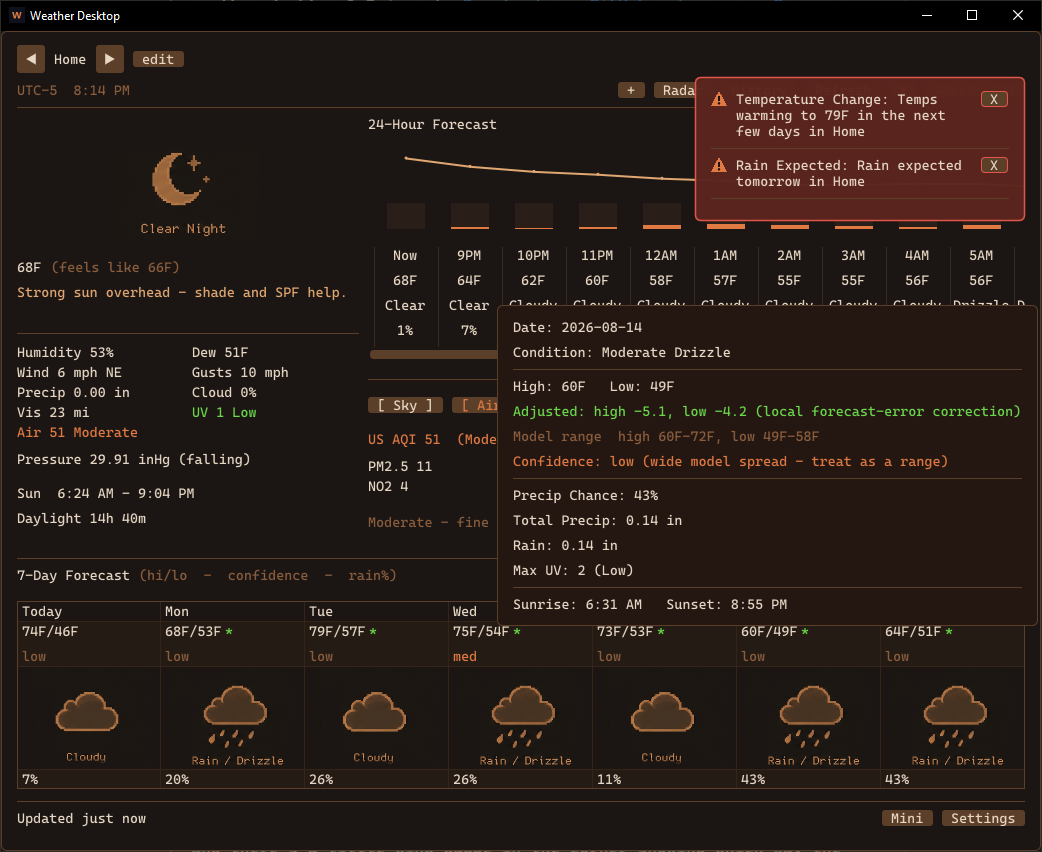
The forecast gets graded. Every fetch is scored against reality: daily highs and lows per lead time, rain probabilities against whether it actually rained, five forecast models (plus MET Norway as a second opinion) against each other, even each hour of the day separately. Once there's enough history, the displayed numbers shift — hover any day and it tells you exactly what was adjusted and why ("Adjusted: high -5.1 — local forecast-error correction"). If forecasts here run five degrees hot, that stops being your problem. There's a confidence line too, built from how much the models agree crossed with how accurate they've actually been at your location the 7-day row now reads hi/lo, confidence, rain% at a glance.
A decade of your weather, on disk. Each location pulls ~10 years of daily history once about 165 KB of plain JSONL (still no database in this app), and everything reads from it: record high/low for today's date, what this date did last year, warm streaks, month rain vs typical, and "days like these" — the last few days matched against every same-season stretch in the archive, with what happened next. Hover the stat and you get the full distribution, not just the average. A seasonal model's three-month lean is measured against your own archive's normals, not some continental baseline.
Nothing leaves your machine. Worth spelling out, since "an app that learns about you" usually means the opposite: all of this learning is local. The app talks directly to the public weather APIs (Open-Meteo, NWS, NOAA, MET Norway, USGS — free, no keys, no accounts), and the history it grades them against lives in plain-text files on your own disk. There's no telemetry, no analytics, and no server of mine in the data path. I dont care to ever see your location, your history, or that you run the app at all. This is just because I kept getting bad rain alerts using a regular app / site. The one thing it fetches from k-engine.org is a static version number to tell you a new release exists, and nothing is sent along with it. Delete the folder and everything it ever knew is gone.
More free data. Pollen, river levels, nearby earthquakes, solar flares, snow depth and freezing level. All keyless, all appearing only where they apply. The sky panel now computes naked-eye planet visibility and moonrise/set locally from a little ephemeris, so it works offline and tells you Venus is a dawn object before you're up.
It also got lighter. The UI used to redraw at 60 fps around the clock, which is a silly thing for a weather dashboard to do — it now sleeps until something changes (roughly 95% fewer frames, real battery savings). Data fetches run in parallel and gzip-compressed, "no tides here" answers are remembered forever instead of re-asked every refresh, and text renders with a real system monospace font with per-monitor DPI awareness (the classic chunky pixel look is still there as a toggle). There's a Mini button now too — a small always-on-top strip with the temperature and the next rain, for the corner of a second monitor.
MIT-licensed, on GitHub, Windows build is portable — unzip and run. The app checks for new releases from here on, so this is the last version you'll have to find by hand.
First feature release after the v1.0 ship a few weeks back. Three things worth calling out:
H.264 hardware encode for screen share. Previously K-os used libvpx (VP8) software encode for every frame, which turned the CPU into a heater during a 1440p stream. The streamer now probes for hardware H.264 (NVENC on NVIDIA, QuickSync on Intel, AMF on AMD, VideoToolbox on macOS, VA-API on Linux), falls back to libx264 or VP8 software if none are present, and tells viewers which codec it picked so they open the right decoder. Anything with a GPU made since ~2010 has hardware H.264 support, so this is essentially a free CPU/battery win for almost every user.
Voice/video SFU got way cheaper. The server used to decrypt every incoming UDP packet, re-encrypt it once per viewer, and forward — which scaled badly with channel size. v1.1 swaps that for a per-channel shared key (Path B): senders encrypt once, the server forwards bytes byte-for-byte, viewers decrypt. Add Opus DTX (don't transmit during silence), in-band FEC (recover single-packet losses without click/gap), and median-based bitrate adaptation so one slow viewer can't anchor everyone else down, and a large voice channel actually feels alive now.
Theme sharing. Settings → Appearance gained Import and Export buttons. Anything dropped into a themes/ folder next to the binary shows up in the theme picker. The three built-in themes (Dark, Light, Korra) stay hardcoded, so they're always there as a starting point — export one and you've got a template to fork.
License switched from MIT to AGPL v3. Anyone modifying K-os and running a public server now has to publish their changes, same as Mastodon / Nextcloud / Matrix's Synapse. The full text is in LICENSE; operator obligations (COPPA, GDPR, network-use trigger under AGPL §13) live in the new DISCLAIMER.md. Also: registration now has a "I am 13 or older" checkbox.
Smaller things in the box: NACK aggregation so retransmits don't storm, TCP upload backpressure, incremental playback drop on overrun, and a new Epoch primitive that prevents stale decoder events from firing across stream restarts. Full list is on the release page →.
Last release I said the next thing on the list was a weather radar. Here it is — animated precipitation, right in the app.
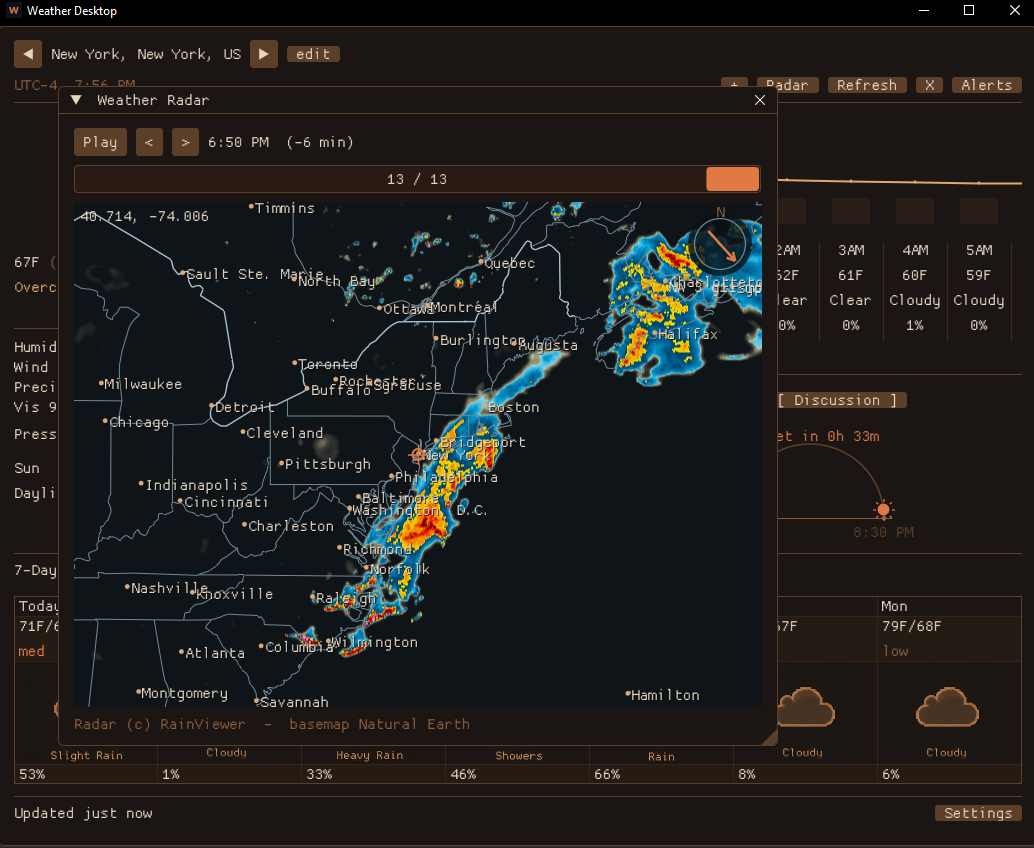
The radar. Hit Radar and a window opens centered on your location with the last couple hours of precipitation plus the short-range nowcast, as animated frames you can play or scrub. Each frame is labeled with the actual time it represents — "2:10 PM (-20 min)" for an observation, "+30 min forecast" for a nowcast frame — so it's always clear whether you're looking at the past or a prediction. Drag to pan, wheel to zoom, and there's a little wind gauge in the corner showing which way the wind's pushing things.
Drawn locally, on purpose. The radar imagery comes from RainViewer (free, no key). Everything under it — coastlines, state and country borders, county lines, interstates, and city/town labels — is drawn by the app from public-domain Natural Earth vectors bundled in the download. Nothing about the map is fetched from a tile server that could log it; the only request that leaves your machine is for the radar tile itself. Same free-and-private posture as the rest of the app.
Getting it to behave. Two problems were worth the trouble. RainViewer rate-limits bursts, and naively grabbing every animation frame for the whole viewport at once trips that instantly — so the app now fetches the frame you're looking at first, prefetches the rest only while animating, reuses connections, and backs off when it's told to. And because RainViewer's data only goes so deep, zooming past it used to show a "zoom not supported" tile; now the app stops requesting past that point and upscales the data it already has, so zooming in just goes soft instead of blank — like every slippy map you've used.
A sky panel that rotates. The Sky panel became a little weather-channel carousel: it cycles (and pauses when you mouse over it) through the sunrise arc / moon / aurora view, an air-quality breakdown with plain-language guidance, the NWS Area Forecast Discussion — the actual narrative a forecaster wrote — an almanac comparing today to the 1991–2020 normal, and tides plus wave height on the coast.
The smaller stuff. A one-line daily takeaway sits atop the current conditions ("Strong sun today — sunscreen if you're out midday"). Rain about to start now fires a push notification, and clicking any notification brings the app up. And there's a light theme now, if the dark Korra palette isn't your thing.
MIT-licensed, on GitHub, Windows build is portable — unzip and run.
This one was mostly about making the data more accurate and more useful while keeping it free and key-less. The headline addition is a minute-by-minute rain nowcast — a single line that tells you "rain starting in ~20 min" or "stopping in ~15 min," pulled from Open-Meteo's 15-minute precipitation series.
Official alerts, not just my guesses. 1.0 derived its own alerts from the forecast. 1.1 adds real US NWS watches and warnings and ranks them above the derived ones, so a tornado warning looks like a tornado warning.
More of what a weather app should show. Current conditions now include air quality (US AQI), UV index, dew point, visibility, and barometric pressure with a 3-hour tendency (rising / steady / falling). The 7-day forecast shows a cross-model confidence chip per day — when the models disagree, you see "low," and the headline high/low is clamped to stay inside that range so the number never contradicts the spread. The 24-hour view got a temperature/precip trend chart that lines up with the columns and scrolls with them; hover any hour for the per-hour rain or snow amount.
A sky panel that knows the time of day. The old "Tonight" panel is now Sky: a sunrise→sunset arc with the sun riding it at the current time and a contextual "Sunset in 3h 34m" / "Sunrise in 8h 12m" countdown, sitting next to the moon phase, aurora odds and active meteor showers.
Little things that add up. A quick-look card when you hover the tray icon. Exact-coordinate entry and one-shot OS geolocation. A "vs yesterday" line. And a performance pass: the forecast now paints immediately on launch (air quality, the model band, aurora and official alerts fill in a beat later instead of blocking the first paint), and the app quits promptly — in-flight network requests are aborted on exit instead of holding the window open while they time out.
There's also a small unit-test suite now, so the parsing and alert logic stay honest. It's MIT-licensed and on GitHub — the Windows build is portable, unzip and run. Next on the list: an open, privacy-clean weather radar built from public-domain NOAA data.
The Windows (x64) build of VidConverter v1.0.0 is now up alongside the macOS one. Download →
It's a portable VidConverter.exe — unzip and run, nothing written to Program Files. FFmpeg does the encoding, so install it and put it on your PATH (winget install Gyan.FFmpeg). The build is unsigned for now, so SmartScreen may ask the first time — More info → Run anyway — and there's a SHA-256 on the release page if you want to verify the download.
The companion yt_fetch YouTube-downloader CLI is a separate optional download on that page — it bundles yt-dlp, same FFmpeg-on-PATH requirement. A Linux build of the same v1.0.0 is still to come.
A universal media converter that wraps FFmpeg in a friendly Tk GUI and a scriptable CLI — same engine behind both. MIT licensed, source on GitHub, and now wearing the Korra theme so it matches the rest of the family.
Highlights:
- Every format that matters — WebM, MP4, MKV, MOV (incl. ProRes), AVI, FLV, animated GIF, audio-only (MP3 / AAC / FLAC / WAV), professional audio (AIFF, 24-bit / 32-bit-float WAV), and TIFF/PNG image sequences. - Profiles, not flag-memorization — tuned High / Balanced / Fast presets per format, savable custom profiles, and a manual codec/CRF/preset panel when you want the wheel. - Batch + scripting — convert shell globs or a JSON manifest that gives each file its own settings, all from the CLI. - YouTube fetch — a companion yt_fetch CLI grabs videos by URL via yt-dlp and converts them in one step. No account required. - Zero Python dependencies — standard library only; FFmpeg does the encoding.
macOS (Apple Silicon) build is up now; Windows and Linux builds of the same v1.0.0 will join it once they're cut from the respective hardware. Needs FFmpeg installed (brew install ffmpeg), or run it from source on any platform with python vidconverter.py.
New project, first release: weather desktop is out. Download → · Source →
It's a small native weather app that lives in your system tray — built with SDL2 + Dear ImGui + OpenGL, pulling weather from Open-Meteo (no API key). Current conditions, a scrollable 24-hour view and a seven-day outlook, all with pixel-art weather icons.
Alerts that know when to be quiet. It watches for severe weather, temperature swings, rain, snow, hail, high wind and freezing precipitation. The part I actually cared about is delivery: you can have alerts pop as they happen, hold them during quiet hours, or batch them into a single daily digest so your night isn't a string of buzzes. New alerts arrive as floating toasts in the corner, and a notification center keeps the history to acknowledge and review.
Tonight. There's a panel for the night sky — the current moon phase (custom-drawn from the date, then swapped for hand-made phase sprites) with illumination, a rough aurora chance computed from your latitude and NOAA's free planetary K-index feed, and any meteor showers that are active, flagged when one's near its peak.
It's MIT-licensed and on GitHub. The Windows build is portable — unzip and run. macOS/Linux and code signing are down the road.
The whole point of filex is moving big files, which means a transfer can be running for a while — long enough that your Wi-Fi blips, your buddy's laptop sleeps, or the network hiccups for a second. In v1.0 any of those killed the transfer outright and you started over from zero. v1.1 fixes that.
Now: a dropped link reconnects and resumes. When the connection drops mid-transfer, filex doesn't fail — it shows "reconnecting…", re-establishes the peer-to-peer link on the same code (retrying for up to a minute), and recovers the file in flight. Unencrypted files resume from exactly where they stopped; password-locked files restart from the beginning (the streaming cipher can't pick up mid-stream — a fair trade for the extra at-rest encryption). This works for both one-shot sends and shared rooms — and in a room, the room itself and your send queue survive the drop, so you don't lose the session.
How it works. The tricky part of reconnecting a live WebRTC connection is that a torn-down connection's callbacks can fire after you've started a new one and quietly corrupt it. So every connection attempt gets a generation number, and a stale callback simply no-ops. The sender's role (who re-offers the channel) is fixed up front and preserved across reconnects, so the two sides always re-pair cleanly no matter who comes back first. The resume offset rides along in the existing handshake: the receiver keeps its partial file, reports how many bytes it already has, and the sender seeks there and continues. One background thread watches for stalls and drives the reconnects.
Also fixed: minimizing the window during a transfer used to peg a CPU core (and could crash on some GPUs) because it kept drawing to a zero-size window. The transfer never depended on the window — it runs on background threads — so v1.1 just stops rendering while minimized.
All of it is covered by a fault-injection test that yanks the connection mid-transfer and confirms the bytes still arrive, hash-for-hash, on both the one-shot and shared-room paths.
A round of polish landed in the same build. The title bar is now tinted to the app's palette so the window reads as one piece instead of a bright strip bolted on top (loaded through DWM at runtime, so it degrades gracefully on older Windows). When a transfer finishes while filex is in the background, the taskbar flashes so you actually notice. Shared-room transfers grew a live speed + ETA readout to match the one-shot view. And when a direct connection can't be made, the error now tells you what to do about it — add a TURN server under the network settings — instead of just giving up.
Grab the v1.1 build and drop a big file on a flaky connection — it'll get there.
A look back at where the engine has been. The clips below are in the order they were captured — earliest experiments at the top, latest at the bottom. Each one was a milestone at the time: the first thing that proved a system was actually working.
## // 1. glyph shapes — first stroke recognition //
The first time the $1 Recognizer could tell one drawn shape from another. No spells wired up yet, no mana, no projectiles — just a stroke buffer, normalization, and a debug panel printing the best match and a confidence score. Drawing a triangle returned "triangle." Drawing a circle returned "circle." It worked. The whole spellcasting pillar collapses out of this one routine, so seeing it land was the green light to start building Arx-style magic for real.
The recognizer plugged into a real cast pipeline. Hold RMB, draw the glyph, release — and if the shape matches a spell in your spellbook AND you have the mana, the spell fires. Magic missile, frost, fireball. Surfaces start to matter here too: frost on water turns the tile to ice for a few seconds. This was the moment the engine stopped being "a renderer with a glyph demo bolted on" and started being a game.
## // 3. bullet time //
A timescale slider wired into the fixed-timestep loop. Press the bind, the sim continues to tick at 60 Hz internally but dt is multiplied by 0.25; the renderer keeps interpolating so everything stays smooth. Projectiles, swing curves, status-effect timers, AI cooldowns — all of them inherit the slowdown for free because they all consume the same dt. The clip is the first proof that the entire simulation could be slowed and resumed without anything desyncing.
## // 4. the in-engine editor //
Phase 10b. The tile-grid world model retired; sectors took over. With sectors came the editor — a 2D plan view on top, a 3D preview underneath, both reading from the same Level struct that the game runs on. Walls split. Portals link sectors. Floors slope. Walking from the editor into play mode is a single key press. Everything you'll see authored in future posts is built in this thing.
## // 5. bhop //
Source-style bunny-hopping. Air-strafing accumulates speed as long as you release ground contact within a tight window and steer the look vector correctly while airborne. Tuning fell out of: the jump impulse, the air- acceleration cap, the friction curve, and a slop window on the ground re-detection. The clip is what "movement feels right" finally looked like.
## // next //
The current focus is doors, locks, and pressure plates — gating systems so levels can have real progression. After that: a vertical slice with a boss designed around the mode-swap. More clips when there's something to show.
The first public drop. Self-hosted Discord alternative for small friend groups — native client, native server, no Electron, no cloud. Years of internal 0.x churn collapsed into a 1.0 that's actually stable.
Highlights since the last internal build:
- Spatial audio. Drag voice participants on a 2D pad in the voice panel; horizontal axis is stereo pan, distance from listener attenuates volume. Local-only mixer — your layout, no protocol changes. - Voice effects + tuner. A small DSP chain (pitch shift, reverb, robot, telephone, distortion, bitcrush) with presets and a "Preview" tuner that loops your mic back to your speakers so you can dial in your voice before joining a call. - Full DPI / UI scaling. Real font-atlas rebuild at the chosen size — text stays crisp, padding scales, the whole UI grows proportionally at 100% / 125% / 150% / 175% / 200%. - Three Windows artifacts. Installer (Inno Setup, signed), portable client zip, and server zip. macOS and Linux 1.0.0 builds drop later from the respective hardware.