weather desktop is a small native weather app that lives in your system tray — current conditions, a minute-by-minute rain nowcast, an hourly and seven-day forecast with pixel-art icons, air quality, an in-app weather radar, and weather alerts that actually know when to leave you alone.
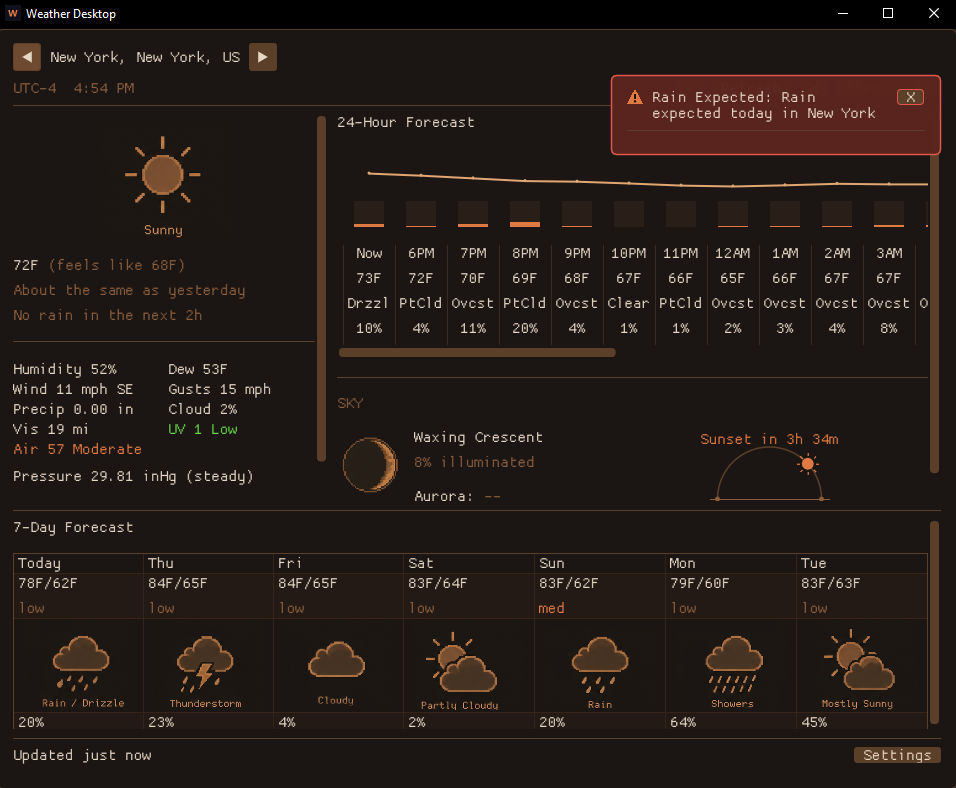
It's built with SDL2 + Dear ImGui + OpenGL and pulls weather, air quality and geocoding from Open-Meteo (no API key, no account), official US alerts from the NWS, and aurora data from NOAA — all free. Add as many locations as you like (search, exact coordinates, or detect-via-OS), flip between °F/°C, and let it sit in the tray updating quietly in the background — hover the tray icon for a quick-look card.
Alerts that respect your night
It watches for severe weather, big temperature swings, rain, snow, hail, high wind and freezing precipitation, and surfaces them as floating toasts plus a tray notification. You decide when: as they happen, only outside quiet hours, or batched into a single daily digest. A notification center keeps the history so you can acknowledge and review what's blown through.
Sky
A dedicated panel for the sky: a sunrise→sunset arc with the sun at the current time and a "Sunset/Sunrise in …" countdown, the current moon phase with illumination, a rough aurora chance for your latitude (from NOAA's free planetary K-index feed), and any meteor showers that are active — with a heads-up when one is near its peak.
Radar
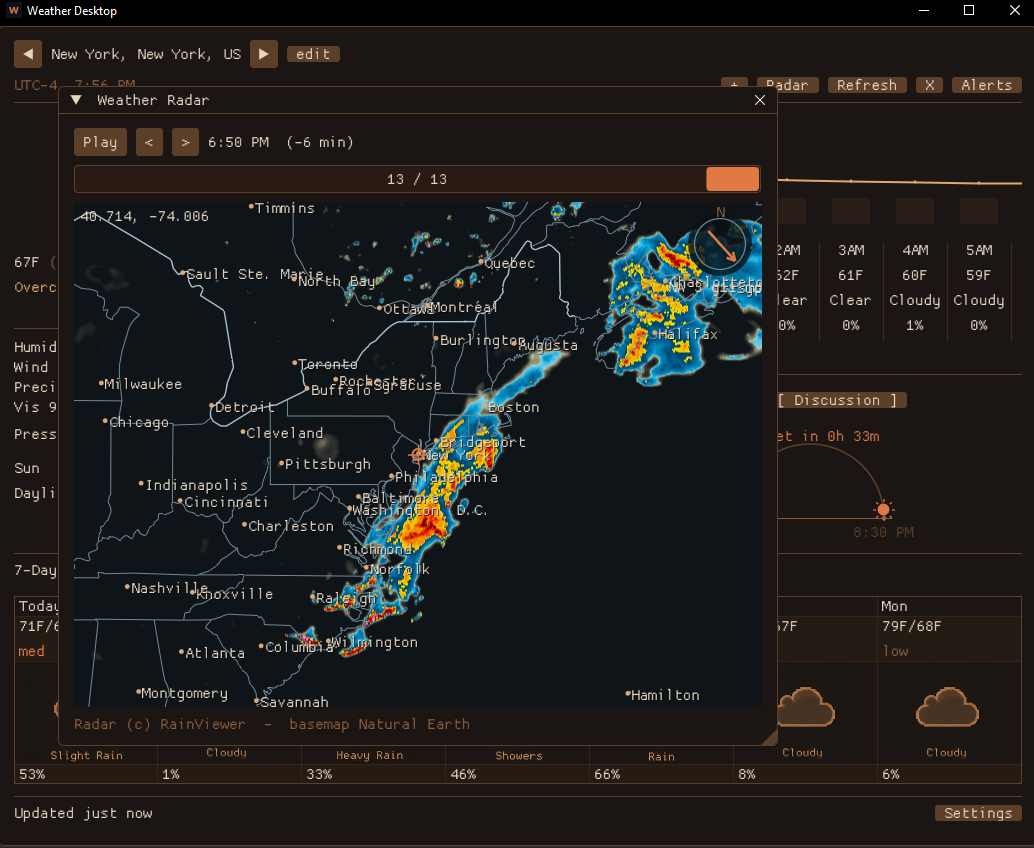
An in-app, animated weather radar (RainViewer past + nowcast frames) you can play, scrub, pan and zoom — each frame labeled with the time it represents, and a wind gauge in the corner. The basemap underneath (coastlines, state/country/county lines, interstates, city labels) is drawn locally from public-domain Natural Earth data, so the only request that leaves your machine is for the radar tile itself.
Get it
Grab the Windows build below — it's portable: unzip and run WeatherDesktop.exe (keep the resources\ folder and DLLs next to it). The source is on GitHub under the MIT license.
// RELEASES //
A crash fixed, the window size finally remembered, and the sun and tide now keep time on their own. Also on GitHub Releases.
Fixed
- Crash during solar flares. NOAA publishes an in-progress X-ray flare with a null class, and it is the newest entry in the feed. Reading that null as text threw, on a background thread, which terminated the app. Every network field is now read defensively, and each of the fifteen data fetchers is isolated: a feed that returns something unexpected loses its own data and nothing more. - The window size you set is remembered. Geometry was only saved when the app exited cleanly, which a tray app rarely does -- closing the window just hides it. The size is now saved when you finish resizing, and a maximized window reopens maximized.
Added
- The sun travels its arc. On opening, the sun runs from sunrise to where it actually is, then keeps time along the arc for the rest of the day. Solar noon is marked at the apex. - Live tide level. The tides card draws the curve between extremes with a marker at this minute -- "Now ~2.3 ft, rising" -- interpolated properly rather than straight-lined. - Motion where things change -- a spinner during fetches, alerts that slide in, cross-fading sky cards, the headline temperature easing to its new value, and the seven-day column under the pointer tinted. - Better crash reports carrying the version, build id, thread and call stack, so a crash can be diagnosed from the text file alone.
Unzip and run WeatherDesktop.exe; keep the resources\ folder and the bundled DLLs alongside it. All data sources are free, no API key.
First run on Windows. The build isn't code-signed yet, so SmartScreen may warn "Windows protected your PC." Click More info -> Run anyway. To verify the download, check its SHA-256 against the hash above:
Get-FileHash .\weather-desktop-1.5.0-win64.zip -Algorithm SHA256
The notification rework: alerts stop repeating themselves. Also on GitHub Releases.
What's new
- One event, one notification — alerts are keyed to the day of the event they describe, so a warm-up spotted three days out is a single notification until that day passes, not a daily (and 6-hourly) repeat. Notified and dismissed state persists across restarts. - Dismiss lasts until the event is over — acknowledge "warming Wednesday" once and it stays quiet through Wednesday. New per-row Dismiss and Mark-all-read buttons in the notification center; updated details refresh the logged entry in place without re-flagging it unread. - Quieter defaults — rain alerts skip trace amounts, and rain/snow alerts say which day they mean.
Unzip and run WeatherDesktop.exe; keep the resources\ folder and the bundled DLLs alongside it. All data sources are free, no API key.
First run on Windows. The build isn't code-signed yet, so SmartScreen may warn "Windows protected your PC." Click More info -> Run anyway. To verify the download, check its SHA-256 against the hash above:
Get-FileHash .\weather-desktop-1.4.1-win64.zip -Algorithm SHA256
If two free sources publish a number, the app now reads both — and believes whichever keeps being right at your location. Also on GitHub Releases.
What's new
- Rain-chance consensus — every source with a rain probability (Open-Meteo's blend, five forecast models, the US NWS forecast, and all ~31 GFS ensemble members) folds into one headline number, weighted by each source's locally learned accuracy. The tooltip shows the spread; the rain% turns amber when sources disagree. Forecast amounts learn a local over/under-call correction too. - Ensemble probabilities and run drift — "24/31 members wet" instead of one model's guess, member percentiles bounding the amount, and a per-day line showing whether recent model runs are trending wetter/warmer for that date. - Real instruments beside the models — METAR airport observations (which also feed the local learning within 30 km), USGS river gauges, NOAA buoys, and tide-station water temperature, each labeled next to its model counterpart. - A constellation guide — all 88 constellations, illustrated, filtered to what's visible tonight from your location, with common names, Wikipedia blurbs, and find-it directions. - ISS passes — visible passes predicted on-device with an SGP4 orbit propagator from a fresh CelesTrak element set. No account, no API. - Aurora, for real — NOAA's OVATION model probability at your exact coordinates plus a 3-day Kp watch line, with GFZ Potsdam as backup. - Official alerts in Canada and Norway, smoke/haze callouts from PM2.5, EMSC earthquakes merged with USGS. - Quality of life — reworked toolbar with a mailbox notification icon, a dozen new settings (24-h clock, alert thresholds, mini-strip opacity / click-through, radar defaults, exact window size), per-mode window memory, smarter layout at large sizes, and one small easter egg in the night sky.
Unzip and run WeatherDesktop.exe; keep the resources\ folder and the bundled DLLs alongside it. All data sources are free, no API key: Open-Meteo (weather, ensemble, previous runs, air quality, marine, flood, climate, seasonal), US NWS, NOAA (tides, buoys, space weather), MET Norway, Environment Canada, USGS, EMSC, GFZ Potsdam, CelesTrak, RainViewer.
First run on Windows. The build isn't code-signed yet, so SmartScreen may warn "Windows protected your PC." Click More info -> Run anyway. To verify the download, check its SHA-256 against the hash above:
Get-FileHash .\weather-desktop-1.4.0-win64.zip -Algorithm SHA256
The app now learns your local weather. Every forecast gets logged and scored against what actually happened; the corrections come from your own history. Also on GitHub Releases.
What's new
- Forecast tuning — per-lead temperature bias correction, rain-chance calibration ("40%" remapped to what 40% actually means at your location), a per-model accuracy scoreboard with the headline blended toward whichever model has been right there, and hour-of-day corrections. New locations borrow gentle corrections from your nearest saved one until they have their own history. - Local climate archive — a one-time ~10-year pull per location powers records for today's date, "days like these" trend analogs (with the full distribution on hover), month-rain vs typical, a seasonal outlook expressed against your own normals, and a last-year overlay on the history chart. - More data, still no keys — pollen, river discharge, MET Norway second opinion, nearby earthquakes, solar flares, snow depth and freezing level. - Local astronomy — naked-eye planet visibility, moonrise/moonset, golden hour, meteor showers, aurora odds. Computed on-device, works offline. - Faster and lighter — the UI only redraws when something changes (~95% fewer frames), data fetches run in parallel and are gzip-compressed, and "no waves/river/tides here" answers are remembered instead of re-asked. - Sharper — real system monospace font (toggleable back to the classic pixel look) and per-monitor DPI awareness. - Mini mode — shrink to a small always-on-top strip.
Unzip and run WeatherDesktop.exe; keep the resources\ folder and the bundled DLLs alongside it. All data sources are free, no API key: Open-Meteo (weather, air quality, marine, flood, climate, seasonal), US NWS, NOAA, MET Norway, USGS, RainViewer.
First run on Windows. The build isn't code-signed yet, so SmartScreen may warn "Windows protected your PC." Click More info -> Run anyway. To verify the download, check its SHA-256 against the hash above:
Get-FileHash .\weather-desktop-1.3.0-win64.zip -Algorithm SHA256
The big one: an in-app weather radar. Also a rotating info carousel and light/dark themes. Also on GitHub Releases.
What's new
- Weather radar — an animated radar overlay (RainViewer past + nowcast frames) with play/scrub, per-frame timestamps, drag-pan and wheel-zoom, and an on-map wind gauge. The basemap — coastlines, state/country/county lines, interstates and city labels — is drawn locally from public-domain Natural Earth, so the only thing any server sees is the radar tile request itself. Deep zoom upscales the data instead of going blank. - Sky carousel — the Sky panel now auto-cycles (pausing on hover) through an air-quality breakdown, the NWS Area Forecast Discussion, an almanac (today vs. the 1991–2020 normal), and tides & marine. - Daily takeaway — a one-line plain-language summary atop the current conditions. - Rain push alerts — a heads-up when rain is about to start; clicking a notification opens the app. - Light / dark themes — selectable in Settings.
Unzip and run WeatherDesktop.exe; keep the resources\ folder and the bundled DLLs alongside it. Weather, air-quality, marine and climate data come from Open-Meteo, alerts and the forecast discussion from the US NWS, tides from NOAA, and radar from RainViewer — all free, no API key.
First run on Windows. The build isn't code-signed yet, so SmartScreen may warn "Windows protected your PC." Click More info -> Run anyway. To verify the download, check its SHA-256 against the hash above:
Get-FileHash .\weather-desktop-1.2.0-win64.zip -Algorithm SHA256
A bigger, more accurate release — more data, more useful panels, and a snappier app. Also on GitHub Releases.
What's new
- Rain nowcast — a minute-by-minute "rain starting/stopping in ~N min" line. - Official US alerts — NWS watches and warnings, ranked above the app's own derived alerts. - More current data — air quality (US AQI), UV index, dew point, visibility, and barometric pressure with a 3-hour rising/steady/falling tendency. - Forecast confidence — the 7-day view shows a cross-model agreement chip (high/med/low) per day; the 24-hour view gets a temperature/precip trend chart aligned to the columns, with per-hour rain/snow amounts on hover. - Sky panel — a sunrise→sunset arc with the sun at the current time and a "Sunset/Sunrise in …" countdown, next to the moon, aurora and meteor readout. - Tray quick-look — hover the tray icon for a compact weather card. - Locations — enter exact coordinates or detect your location via the OS, plus a "vs yesterday" comparison. - Faster — the forecast paints immediately on launch (extras fill in after), and the app quits promptly instead of waiting out in-flight requests.
Unzip and run WeatherDesktop.exe; keep the resources\ folder and the bundled DLLs alongside it. Weather and air-quality data come from Open-Meteo, official alerts from the US NWS, and aurora data from NOAA SWPC — all free, no API key.
First run on Windows. The build isn't code-signed yet, so SmartScreen may warn "Windows protected your PC." Click More info -> Run anyway. To verify the download, check its SHA-256 against the hash above:
Get-FileHash .\weather-desktop-1.1.0-win64.zip -Algorithm SHA256
First public release. A native tray weather app with forecasts, sky events, and alerts that know when to stay quiet.
What's in it
- Current conditions + forecasts — temperature, feels-like, humidity, wind, gusts, precip and cloud cover, a scrollable 24-hour view, and a seven-day outlook, all with pixel-art weather icons. - Smart alerts — severe weather, temperature swings, rain/snow/hail, high wind and freezing precipitation, shown as floating toasts and tray notifications, with a notification center to acknowledge and review them. - Notification scheduling — deliver alerts immediately, only outside quiet hours, or as one daily digest. - Tonight — moon phase with illumination, aurora chance for your latitude (NOAA Kp index), and active meteor showers. - Multiple locations, °F/°C + mph/km-h, and start-minimized.
Unzip and run WeatherDesktop.exe; keep the resources\ folder and the bundled DLLs alongside it. Weather data comes from Open-Meteo and aurora data from NOAA SWPC — both free, no API key.
First run on Windows. The build isn't code-signed yet, so SmartScreen may warn "Windows protected your PC." Click More info -> Run anyway. To verify the download, check its SHA-256 against the hash above:
Get-FileHash .\weather-desktop-1.0.0-win64.zip -Algorithm SHA256