A self-hosted Discord alternative for small friend groups. Native desktop client with real-time text chat, voice chat, video streaming, inline media, friends & DMs, end-to-end encrypted channels, role-based permissions, and real moderation tools for whoever runs the server. Your server. Your rules. Your voice.
Built in C++20 with a custom binary protocol — no Electron, no web browser, no cloud dependencies. Spin up the server on a VPS or your own box; everyone runs the native client.
## // WHAT IT DOES //
K-os is a full chat stack that runs on machines you own.
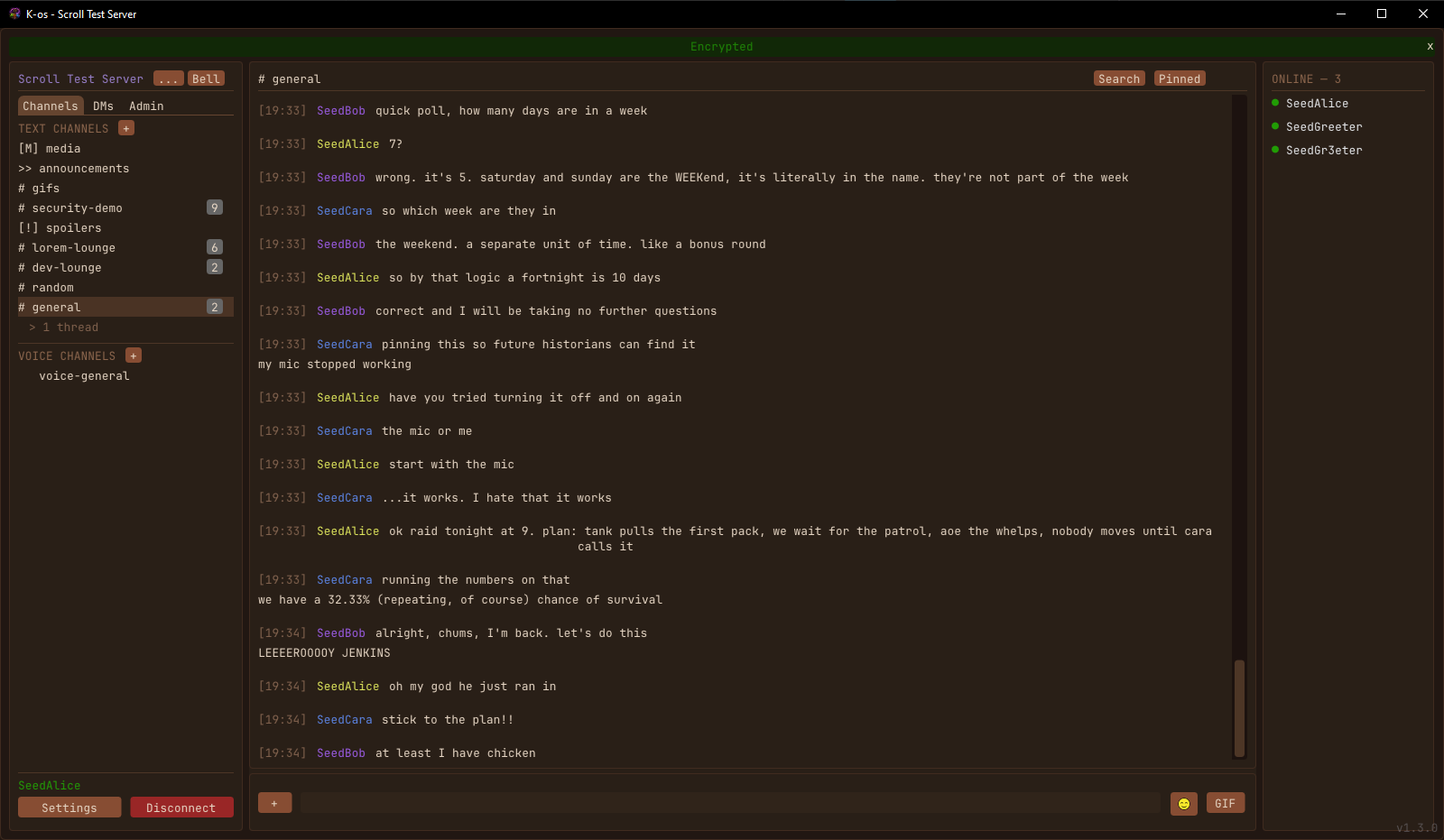
Text chat — real-time messaging, message history, threads, replies, edits, deletes, pinning, full-text search, link previews, channel topics, typing indicators, markdown (bold, italic, ~~strike~~, ||spoiler||, `code`, ```code blocks```), emoji reactions, 32 built-in emojis plus custom server emojis, scheduled messages, polls, saved messages, and OSRS-style colour prefixes (red:hi everyone).
Voice chat — Opus codec with SDL2 capture/playback through an SFU relay. Push-to-talk, voice-activity detection, or toggle modes. RNNoise neural denoise, Opus DTX (silent participants cost zero bandwidth) and in-band FEC (single-packet losses recover without a click). Per-user volume sliders, spatial audio (drag participants on a 2D pad to position them in stereo), and a voice-effects rig with pitch shift, reverb, robot, telephone, distortion, and bitcrush — all live, with a standalone tuner that loops your mic back to your own speakers so you can dial in your sound without joining a call. Whisper hotkey routes only to selected users. Voice messages, soundboard, and personal entrance sounds round it out.
Video — screen sharing (DXGI on Windows, X11 on Linux) and webcam capture. The streamer probes for hardware H.264 (NVENC / QuickSync / AMF / VideoToolbox / VA-API) and falls back to libx264 or VP8 software so anything with a GPU made since ~2010 gets free hardware encode. Adaptive bitrate (median-based across viewers so one slow watcher doesn't drag everyone down), NACK retransmission with dedupe, server-enforced caps, and a viewer-side magnifier (mouse-wheel zoom + right-click pan).
Friends & DMs — friend requests, presence, end-to-end encrypted 1-on-1 and group DMs (X25519 ECDH + AES-256-GCM), encrypted attachments, read receipts, DM threads, DM voice calls.
End-to-end encrypted channels — the server is a blind relay. Encrypted channel keys are distributed per member; attachments auto-purge from the server once everyone has them.
Admin & moderation — role-based permissions (44 granular flags across 6 categories), temporary roles, kick / ban / mute / timeout, ban-list management, server-side broadcasts, audit log, user-approval queue, file-upload whitelist, custom emoji management, ownership transfer. AutoMod rules (keywords, mention spam, links), a report queue, incoming and outgoing webhooks, and slash commands for bots.
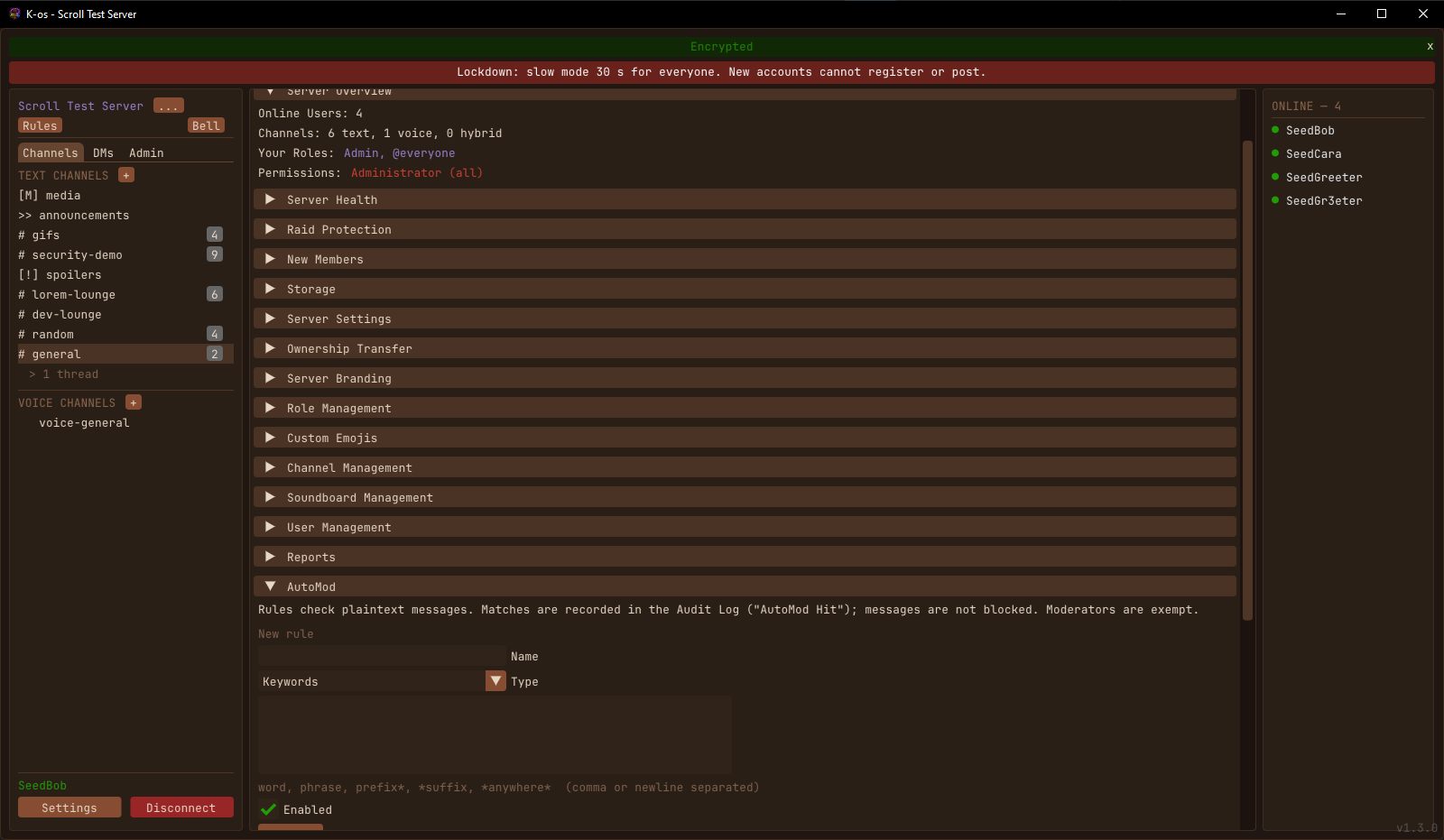
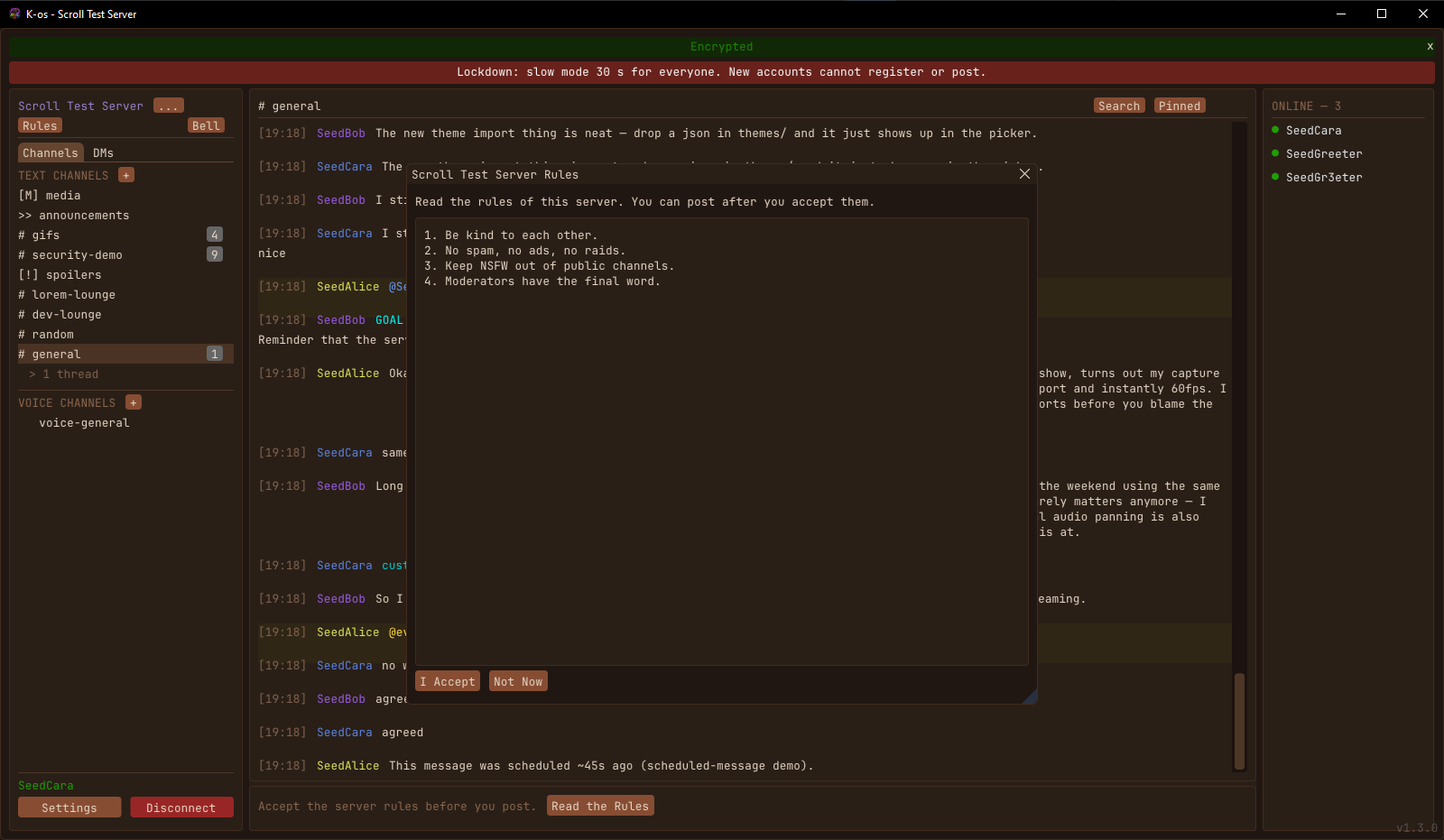
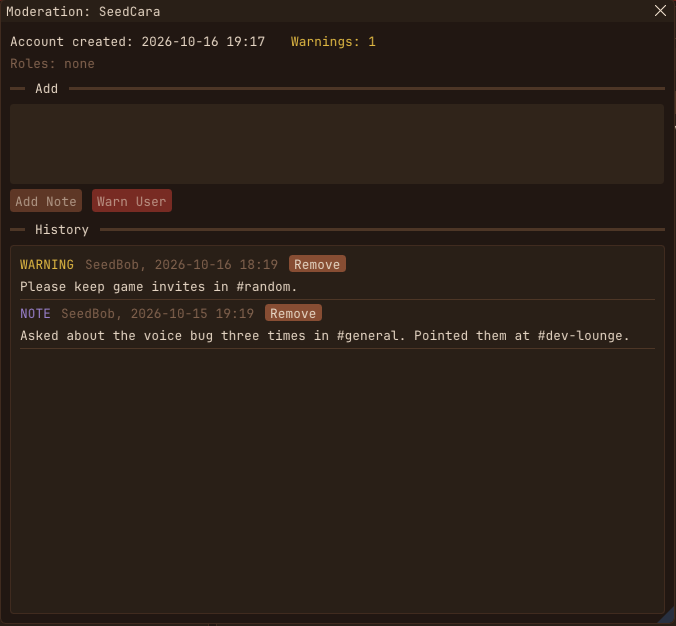
Tools for the person who runs the server — a raid lockdown button (no new registrations, slow mode for everyone, new accounts held, moderators unaffected), an optional join gate for brand-new accounts, optional server rules that members accept before they post, moderator notes and warnings that stay with an account, a storage dashboard with per-user limits, and a server health page.
Security & privacy — DMs and encrypted channels stay sealed even from moderation: a reported DM carries no text at all, so a server owner never gets a path into anyone's DMs. Logins use PBKDF2 with a per-server salt, and the client pins the server's key before it sends a password. Optional message signatures (a per-device key; the badge warns when someone's key changes, like SSH) and an opt-in set of advanced tools: DM safety numbers, look-alike name warnings, server key history, and your account's login activity. You choose when images load (always, friends only, or on click). Every protocol parser is fuzzed.
Bot / scripting — embedded Lua 5.4 sandbox with 65+ API functions and 30+ events. Music streaming via yt-dlp + ffmpeg + Opus into voice channels.
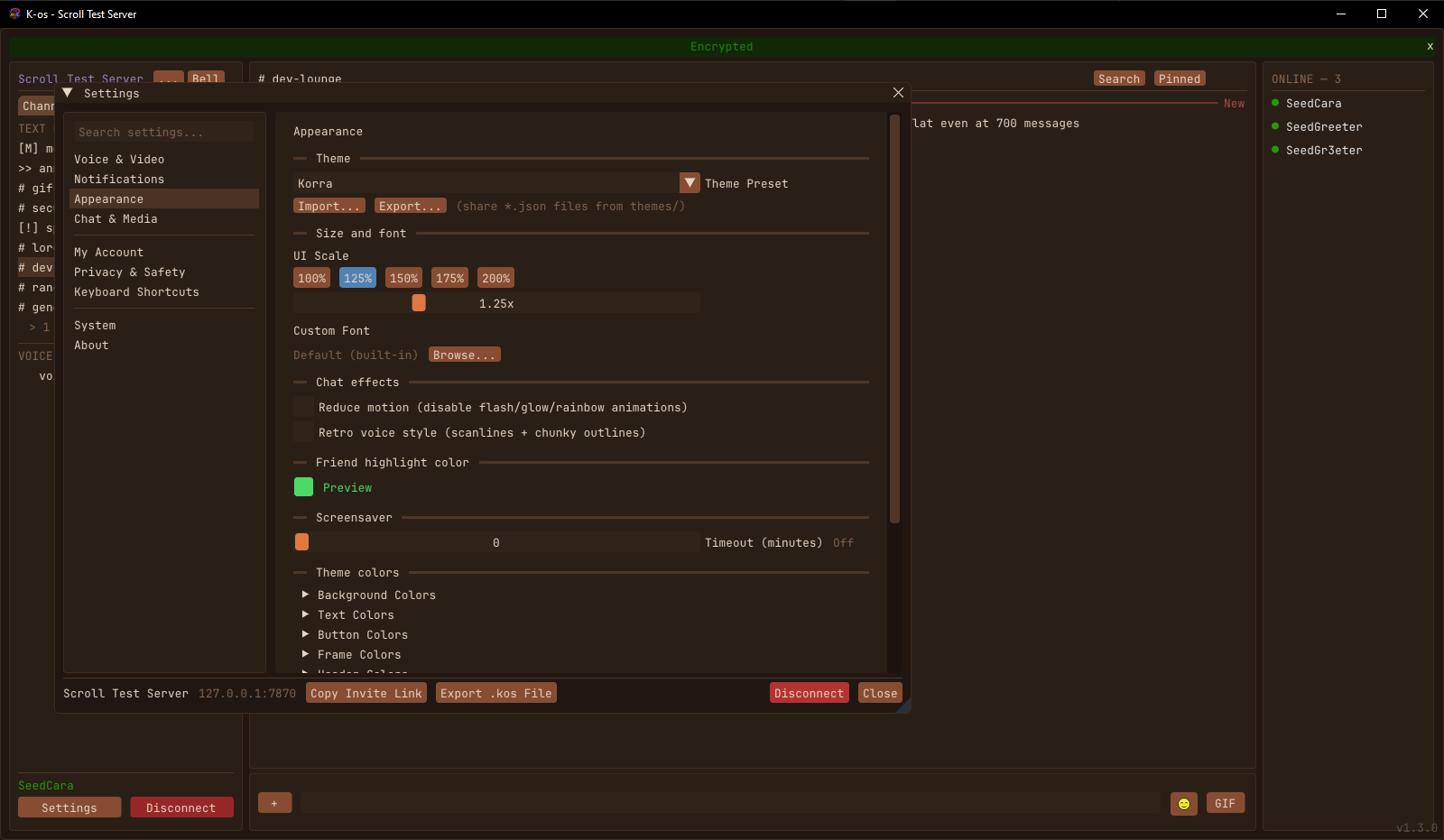
Notifications, themes, accessibility — unread badges, @mention highlighting, system-tray integration, snooze, 50+ themable colour fields with a live editor, theme Import/Export so you can share palettes with friends as JSON files (drop them into a themes/ folder to use them), full DPI / UI scaling (100% / 125% / 150% / 175% / 200% presets), reduce-motion toggle. Settings are organised into pages with a search box, and everything saves as you change it.
## // HOW IT WORKS //
┌──────────────┐      TCP :7770 (TLS)     ┌──────────────┐
│    Client    │◄────────────────────────►│    Server    │
│  SDL2+ImGui  │       UDP :7771          │  SQLite DB   │
│  OpenGL3     │◄────────────────────────►│  SFU Voice   │
└──────────────┘     (voice/video/Opus)   └──────────────┘
- Client — SDL2 + Dear ImGui with the OpenGL3 backend. Native, no browser engine. Talks to the server over TCP (control + text/media) and UDP (voice + video). Image decoding, disk reads and upload preparation run off the UI thread, so a media-heavy channel scrolls smoothly. - Server — single-process, multi-threaded. select()-based TCP event loop, a work pool for slow jobs (password hashing, image cleanup), plus a dedicated UDP voice/video thread that runs as an SFU (forwards packets per channel; never mixes audio, never re-encodes video). SQLite for all persistence — messages, users, channels, attachments, audit. Self-signed TLS certs auto-generated on first run. - Protocol — custom binary, little-endian. 8-byte TCP header plus payload. 300+ message types covering auth, channels, text, media, voice, video, friends, DMs, roles, reactions, moderation, admin, and encryption. Versioned (current: v4 — peers with mismatched versions are rejected at handshake). - E2E layer — for encrypted channels and DMs, the server is treated as untrusted. X25519 ECDH between participants establishes a shared key; AES-256-GCM encrypts messages and attachments. The server stores ciphertext only; encrypted attachments auto-purge once all recipients fetch them. - Transport encryption for voice/video — a per-channel shared key (AES-256-GCM) is distributed by the server to each member, wrapped with a KEK derived from that member's voice session token via HKDF-SHA256. The SFU forwards packets byte-for-byte without decrypting — senders encrypt once, viewers decrypt. Keys rotate on join/leave with a short overlap so in-flight packets still decode cleanly.
## // GETTING STARTED //
The easy path is the Windows installer, the macOS app, or the Linux AppImage below — download, run, you're in. The client will guide you through connecting to a server. (The macOS build is Apple Silicon, self-contained, and not yet notarized — right-click → Open the first time. On Linux, make the AppImage executable and run it.)
To run your own server, grab the Windows server zip or the Linux server tarball, put it on a box with TCP 7770 + UDP 7771 reachable, and run kos_server. Defaults are sensible out of the box. Self-hosting tips are in the server admin guide that ships with the source.
Licensed GNU AGPL v3: same license as Mastodon, Nextcloud, and Matrix's Synapse. Anyone modifying K-os and running a public server must publish their changes. Full source release coming soon — the repository is currently private while the early 1.x line stabilizes.
// RELEASES //
The biggest release so far. It started as a security audit and grew into a full moderation and server-owner toolkit, plus a lot of work to keep the client smooth while it loads media.
Security
- Security audit pass. Hardened session handling, every protocol message parser checks its counts before it allocates, link previews can no longer be pointed at your local network, stricter access checks, and limits on how much memory an image can take to decode. Third-party dependencies are pinned by hash. - Protocol v4. Logins use a per-server salt and PBKDF2, accounts migrate on their next login, and encrypted payloads are bound to their context (AES-GCM associated data). The client pins the server's TLS key before it sends a password. - Voice and video replay protection with a sliding window per stream. - Message signatures (opt-in). Each device gets an Ed25519 key and can sign messages, replies and attachments. A badge shows whether a signature matches the key you saw from that person before, like SSH. - Advanced security tools (opt-in) in one Security window: DM key pins and safety numbers, verified signing keys, warnings for look-alike user names, server key history, your account's login activity, and a log of who holds each encrypted channel's key. - Image safety. Choose when images load (always, friends and DMs only, or never until you click), and optionally decode only PNG, JPEG and GIF. The server checks image types on upload. Encrypted video uploads no longer send a plain thumbnail.
Moderation
- Timeouts from the user menu (60 seconds to a week). - AutoMod: keyword, mention-limit and link rules, logged to the audit log. - Report queue. Anyone can report a message. Reports from encrypted channels carry only that one message, with the reporter's consent; DM reports carry no text at all, so server owners never get a path into DMs. - Webhooks, incoming and outgoing (signed with HMAC), and bot slash commands.
Server owner tools
- Raid lockdown. One button stops new registrations, puts everyone on slow mode, and holds new accounts. Moderators are not affected, and everyone sees a lockdown bar. - Join gate. Optionally, accounts must be a set age before they can post, DM or upload. - Server rules. Optional; members accept them before they post, and you can make everyone accept them again when they change. - Moderator notes and warnings. Private notes per user, and warnings the user actually sees, with a history per account. - Storage dashboard. Disk use per user and per channel, the largest files with a delete button, and an optional storage limit per user. - Server health. Uptime, memory, users, messages per minute, traffic, database and media size. - Temporary roles (an hour to 30 days) and a role on join.
Client
- New settings window: a page list instead of one long scroll, with a search that finds options on any page, and everything saves automatically. - Replies in threads. - Smoother media. Images, video thumbnails, disk reads, hashing and upload preparation all moved off the UI thread. Images out of view are released, the media cache is kept per server, and there is a setting for the largest image to decode. - GIF avatars animate in profiles and keep their shape; the login logo got a proper frame; GIF library tiles crop instead of stretching. - Server messages like "Slow mode active" now actually show up on screen.
Install
Windows installer or portable zip for the client, server zip for self-hosters. This release moves to protocol v4, so clients and servers both need updating: a v1.3 client won't talk to a v1.2 server, or the other way around.
Linux and macOS builds are new this release, built automatically from the tagged source. On Linux, make the AppImage executable and run it. The macOS app is for Apple silicon and isn't notarized yet, so the first time, right-click it and choose Open (or allow it in System Settings → Privacy & Security).
A features-and-polish release. The headline is a per-server GIF library that needs no third-party account, plus a rewritten message input that finally does multi-line composing.
GIF library
Every other chat app reaches for Giphy or Tenor, which means an API key, a rate limit, and a third party seeing what you search. K-os does it differently: GIFs posted in a server accumulate into that server's own library, and the picker searches those.
- Post any .gif in a normal channel and it's added automatically. Open the GIF button in the message bar to search the collection by name or tag and post one back — no re-upload, it just re-references the file already on the server. - Popular GIFs float to the top by use count. Admins can tag entries for better search, or remove ones that shouldn't be there. - Server owners who'd rather curate can flip gif_auto_index off and add GIFs deliberately instead. - Nothing from encrypted channels or DMs ever enters the library. - New MANAGE_GIFS permission covers tagging and removal.
Rewritten message input
The input bar had grown to six buttons crowded around the text field. It's now down to two clusters, and it composes properly.
- Multi-line at last. Shift+Enter (or Ctrl+Enter) starts a new line, Enter still sends. The bar grows as you write, up to five lines, and you can drag its top edge to make it taller for longer posts. - Attach (+) on the left; emoji and GIF on the right. Formatting, chat effects, voice messages, scheduling and polls all moved into a right-click menu on the input same tools, less clutter. - Fixed a bug where text format Ctrl+B/I/U with nothing selected would drop the formatting marks at the very start of your message instead of at the cursor.
Readability
- Configurable spacing between message groups. A gap is inserted wherever a different person starts talking; consecutive messages from the same person stay tight. Slider in Settings → Appearance (0–24px, default 8). - Open channels at the first unread message. Instead of jumping to the newest message, you land on the first one you haven't read with context still visible above it. The red "New" divider marks the spot and clears once you start scrolling. Toggle in Settings → Appearance to go back to jump-to-latest.
Smaller things
- Threads no longer show a running reply total that ticked up on your own replies and on threads you'd already read. The unread badge is the only indicator now, and opening a thread clears its notifications. - The "I am 13 or older" checkbox moved off the login form into a confirmation step shown only when you register. - Messages can now be attachment-only — previously an image or GIF with no caption was silently dropped by the server. - Optional hover-to-play for inline GIFs (Settings → Appearance) for anyone who finds a wall of looping GIFs distracting.
Install
Windows installer or portable zip for the client, server zip for self-hosters. This release bumps the wire protocol, so clients and servers both need updating — a v1.2 client won't talk to a v1.1 server. macOS and Linux builds follow once cut from other hardware.
First feature release after v1.0. Big-picture changes: H.264 hardware encode for screen share, much cheaper voice/video SFU, theme sharing via a shared folder, and a license switch from MIT to GNU AGPL v3.
Voice and video
- H.264 hardware encode for screen share, with an automatic probe chain (NVENC → VideoToolbox → QuickSync → AMF → VA-API) and libx264 + VP8 software fallback. CPU cost drops dramatically on any machine with a supported GPU — which is essentially anything since 2010. - Per-channel shared SFU key replaces per-recipient encrypt/decrypt. The server now forwards voice and video UDP packets byte-for-byte instead of re-encrypting per viewer. Scales to large channels without the CPU melting. - Opus DTX + in-band FEC on the voice path. DTX cuts bandwidth during silence (huge in a 20-person call where most people aren't talking). FEC recovers single-packet losses without the click/gap. - Median-based bitrate adaptation over a sliding quality window — one bad viewer can no longer drag everyone else's bitrate down. - NACK aggregation, TCP upload backpressure, incremental playback drop on overrun, and a new Epoch primitive for safer late-event handling across decoder restarts.
Theme sharing
- New presence + voice-whisper theme fields, with defaults across all three built-in themes (Dark, Light, Korra). - A themes/ directory next to the binary is scanned on startup and every theme found shows up in the preset combo. Import and Export buttons in Settings → Appearance let you save your current palette to a JSON file or load one a friend shared. - The three built-in themes stay hardcoded so they're always there as fall-backs; exporting any of them gives you a template to fork.
User-facing
- Age confirmation checkbox required to register a new account (gates the Register button, documents the 13+ claim from the user side).
Licensing
- K-os is now GNU AGPL v3 (was MIT). AGPL is the right license for a self-hosted chat service: anyone modifying K-os and running a public server has to publish their changes, same as Mastodon / Nextcloud / Matrix's Synapse. See the new LICENSE and DISCLAIMER.md in the repo for the full text and operator-responsibility notes (COPPA, GDPR, etc.).
Install
Same as before — Windows installer signs and runs cleanly, the portable zip is for people who don't want an installer, and the server zip is for self-hosters. macOS and Linux v1.1 builds will follow once they're cut from other hardware.
First public release. Windows and macOS (Apple Silicon) client builds are up; a Linux build of the same v1.0.0 will be added under this entry once it's cut.
What's in it
Full-feature text chat (threads, replies, edits, deletes, search, link previews, polls, scheduled messages, markdown, reactions, OSRS colour codes), Opus voice chat with PTT / VAD / toggle modes, RNNoise denoise, spatial-audio positioning, a voice-effects rig (pitch / reverb / robot / telephone / distortion / bitcrush) with a standalone tuner, VP8/VP9 screen sharing and webcam with adaptive bitrate and zoom/pan in the viewer, end-to-end encrypted DMs and channels, 41-flag role permissions with admin panel, embedded Lua bot, custom themes, full DPI scaling.
Install
Windows — run the installer. It'll prompt to trust the included code-signing certificate so future updates install cleanly. Then launch K-os, point it at a server, and register an account.
macOS — unzip and drag K-os.app to Applications. The build is self-contained (no Homebrew needed) but unsigned, so the first launch needs a right-click → Open to get past Gatekeeper. Apple Silicon only for now.
To host your own server, grab the server zip, unzip it on a Windows box with TCP 7770 and UDP 7771 reachable, and run kos_server.exe. Defaults are sane; --help lists options.
| file | type | size |
|---|
| KosSetup-1.0.0.exe
sha256 05363856153e9b9fd5be0805e843b7297cd32dbaede9791bd84865220fb05593
|
Windows Client Installer |
43 MB |
| kos-client-1.0.0-win64.zip
sha256 e17f47d31326835164e74d9dde1d75dac6c9ef219b18453b0f965d0bd9c8a0e4
|
Windows Client (portable) |
62 MB |
| kos-server-1.0.0-win64.zip
sha256 0c6a62121efc1ebcc3de41ca571f337eb4765e8179a64673f645b63f1d74868c
|
Windows Server |
4.5 MB |
| kos-1.0.0-macos.zip
sha256 a6bb36cdafe605f22a9040c0ddc16167a654fc0aaa5075a0424a5c803f295b0b
|
macOS Client · Apple Silicon (arm64) |
21 MB |
| SHA256SUMS-1.0.0.txt
|
Checksums (sha256sum -c) |
1 KB |